Grade 12 Practical Study Reference
A printable guide to the practical Delphi programming for Grade 12 (Paper 1 skills), with the year planner and exam extras.
Contents — Grade 12 Practical
- Practical
- SQL
- SQL - Joining Tables
- OOP
- 2D Arrays
- Recursion
- Term Planner
- Grade 12 - By Term
- Exam Resources
- Exam Extras (Out-of-CAPS)
SQL — Structured Query Language Grade 12
SQL (pronounced "S-Q-L" or "sequel") is the language used to communicate with a database. It lets you retrieve, add, update and delete records. In Delphi, SQL is added to a TADOQuery component.
Think of a database as a massive spreadsheet with thousands of rows. SQL is how you ask the database a question: "Give me all students in Grade 12 with a mark above 80, sorted by surname." Without SQL, you would have to scroll through every row manually.
Anatomy of a SQL Statement
Using SQL in Delphi
SQL goes into the SQL property of a TADOQuery component. Always close the query before changing the SQL, then open it again.
// Method 1: assign as one string
qryStudents.Close;
qryStudents.SQL.Text := 'SELECT * FROM tblStudents WHERE Grade = 12';
qryStudents.Open;

// Method 2: build line-by-line (easier to read for long queries)
qryStudents.Close;
qryStudents.SQL.Clear;
qryStudents.SQL.Add('SELECT Name, Surname, Mark');
qryStudents.SQL.Add('FROM tblStudents');
qryStudents.SQL.Add('WHERE Grade = 12');
qryStudents.SQL.Add('ORDER BY Surname ASC');
qryStudents.Open;
SELECT — Choosing What to Display
SELECT * FROM tblCD;                      -- all fields, all records
SELECT CDName, Artist FROM tblCD;          -- only these two fields
SELECT DISTINCT Genre FROM tblCD;          -- each genre shown once only
SELECT TOP 5 * FROM tblCD;               -- first 5 records only
WHERE — Filtering Records
The WHERE clause is how you filter — like asking "show me only the records that match this condition."
WHERE Genre = "Rock"             -- exact match (text in double quotes)
WHERE Price < 100               -- numbers (no quotes)
WHERE Grade <> 11              -- not equal
WHERE Mark >= 50              -- greater than or equal
WHERE Genre = "Pop" AND Price < 100       -- both must be true
WHERE Genre = "Pop" OR Genre = "Rock"     -- either can be true
Operator Precedence in Compound Conditions
When a WHERE clause mixes AND and OR, SQL doesn't just evaluate left to right — it follows a fixed order of precedence, same as in maths:
| Order | Operator(s) |
|---|---|
| 1 (first) | Parentheses ( ) |
| 2 | Multiplication, division |
| 3 | Subtraction, addition |
| 4 | NOT |
| 5 | AND |
| 6 (last) | OR |
AND is evaluated before OR, so a mixed condition may not filter the way you expect unless you add brackets to force the order you want.
WHERE Genre = "Pop" OR Genre = "Rock" AND Price < 100
-- reads as: Genre = "Pop"  OR  (Genre = "Rock" AND Price < 100)
-- ALL Pop CDs are included, regardless of price!

-- To make BOTH genres respect the price limit, use brackets:
WHERE (Genre = "Pop" OR Genre = "Rock") AND Price < 100You don't have to memorise the precedence table if you always wrap OR conditions in brackets when combining them with AND. Brackets make your intention explicit and remove any ambiguity — for the reader and for the database.
Special WHERE Operators
| Operator | Meaning | Example |
|---|---|---|
LIKE | Pattern match. % = any chars, _ = one char | WHERE Name LIKE "S%" — starts with S |
IN | Match any value in a list | WHERE Genre IN ("Rock","Pop","Jazz") |
BETWEEN | Within a range (inclusive for numbers) | WHERE Price BETWEEN 50 AND 150 |
IS NULL | Field is empty/blank | WHERE CellNo IS NULL |
IS NOT NULL | Field has a value | WHERE CellNo IS NOT NULL |
#date# | Date values use # symbols | WHERE OrderDate = #2024-05-01# |
Access SQL can misinterpret a date written as dd/mm/yyyy, reading it as month/day/year instead. Writing the year first removes the ambiguity: prefer #2024/05/01# (yyyy/mm/dd) over #01/05/2024#.
WHERE CDName LIKE "S%"        -- starts with S
WHERE CDName LIKE "%love%"    -- contains the word "love"
WHERE CDName LIKE "%s"        -- ends with s
WHERE Code   LIKE "A__"       -- starts with A followed by exactly 2 chars
LIKE with Text Typed by the User
When the search word comes from an Edit, you build the pattern by gluing the wildcard symbols onto the text in Delphi. A % on each side means "the text may appear anywhere in the field"; a % on one side only means "starts with" or "ends with".
sFind := edtFind.Text;
sSQL  := 'SELECT Title, Summary ' +
         'FROM tblBooks ' +
         'WHERE Summary LIKE "%' + sFind + '%"';
// if the user types  rugby  the finished SQL ends:  WHERE Summary LIKE "%rugby%"

qryBooks.Close;
qryBooks.SQL.Text := sSQL;
qryBooks.Open;A Delphi program talking to the database through ADO normally uses % (many characters) and _ (one character), which is what the examples on this page use. Access's own query designer uses * and ? instead. Use whichever symbol the supplied database responds to — if a LIKE query returns nothing when you know there are matches, the wildcard is the first thing to check. Also note that if the typed text itself contains a double quote, the string breaks; the parameterised version further down avoids that problem.
Alternatives and Missing Values in a Built String
IN is a shorthand for several OR tests on the same field. For a missing value, always test with IS NULL — the equals sign never matches a Null.
SELECT * FROM tblTrips WHERE Destination IN ("Paarl", "Stellenbosch");
-- identical to: Destination = "Paarl" OR Destination = "Stellenbosch"

SELECT * FROM tblTrips WHERE DriverCell IS NULL;     -- no cell number captured
SELECT * FROM tblTrips WHERE DriverCell = NULL;      -- WRONG: matches nothing, ever
When one condition must hold together with a choice between alternatives, put the alternatives in brackets — the same brackets you would use in the SQL window, just inside a Delphi string:
sSQL := 'SELECT * FROM tblTrips ' +
        'WHERE (Destination = "Paarl" OR Destination = "Stellenbosch") ' +
        'AND Fare >= 80';
// without the brackets, the fare test would apply to Stellenbosch trips only
ORDER BY — Sorting Results
SELECT * FROM tblCD ORDER BY Artist;             -- ascending (default)
SELECT * FROM tblCD ORDER BY Price DESC;        -- most expensive first
SELECT * FROM tblCD ORDER BY Genre, CDName ASC; -- sort by genre, then name
Calculated Fields & Aliases
You can do maths inside a SELECT and give the result a name using AS.
SELECT Name, Price, Price * 1.15 AS PriceWithVAT FROM tblProducts;
SELECT Name, Mark, ROUND(Mark / 2, 0) AS HalfMark FROM tblStudents;
Aggregate Functions — Calculating Summaries
| Function | What it calculates | Example |
|---|---|---|
COUNT(*) | Number of records | SELECT COUNT(*) FROM tblStudents |
SUM(field) | Total of numeric field | SELECT SUM(Mark) FROM tblResults |
AVG(field) | Average of numeric field | SELECT AVG(Mark) FROM tblResults |
MIN(field) | Lowest value | SELECT MIN(Price) FROM tblProducts |
MAX(field) | Highest value | SELECT MAX(Price) FROM tblProducts |
-- Count students per grade
SELECT Grade, COUNT(*) AS Total
FROM tblStudents
GROUP BY Grade;

-- Only show groups with more than 10 students
SELECT Grade, COUNT(*) AS Total
FROM tblStudents
GROUP BY Grade
HAVING COUNT(*) > 10;
WHERE filters individual records before grouping. HAVING filters groups after GROUP BY. If you have both, WHERE runs first.
Joined Tables, ROUND(AVG) and HAVING Together
A typical longer query combines everything: two tables linked in the WHERE clause, a group per record of the "one" table, a rounded average, and a filter on that average. Here every taxi rank has many trips, and we want the ranks whose average fare is above R45.
SELECT R.RankName, ROUND(AVG(T.Fare), 2) AS AvgFare
FROM tblRanks R, tblTrips T
WHERE R.RankID = T.RankID
GROUP BY R.RankName
HAVING AVG(T.Fare) > 45;- WHERE R.RankID = T.RankID matches each trip to its rank (the primary key and foreign key). You may add ordinary conditions here too, e.g.
AND T.TripDate >= #2026/09/01#, which discard individual trips before any averaging. - GROUP BY collects the remaining trips into one group per rank.
- AVG and ROUND are worked out once for each group.
- HAVING then keeps only the groups whose average passes the test.
Access does not let HAVING (or WHERE) use a name you created with AS. Repeat the calculation: HAVING AVG(T.Fare) > 45, not HAVING AvgFare > 45. Also never put an aggregate such as AVG(...) in WHERE — the groups do not exist yet at that stage.
SQL String & Math Functions
| Function | Returns | Example |
|---|---|---|
LEN(field) | Character count | SELECT LEN(Name) FROM tblStudents |
LEFT(field, n) | First n characters | LEFT(Surname, 3) → first 3 letters |
RIGHT(field, n) | Last n characters | RIGHT(IDNo, 4) |
MID(field, start, n) | Substring from position | MID(IDNo, 3, 2) → month of birth (position 1–2 is the year) |
ROUND(field, dec) | Rounded value | ROUND(Avg, 2) → 2 decimal places |
INT(field) | Integer part (no decimal) | INT(75.8) = 75 |
FORMAT(field, "0.00") | Formatted string | FORMAT(Price, "R0.00") |
Joining Text with &
In Access SQL the & operator joins pieces of text into one value. Any text you type yourself goes in quotes; field names do not. Give the joined result a heading with AS, otherwise the column gets a meaningless default name.
qryLearners.Close;
qryLearners.SQL.Text :=
  'SELECT Surname & ", " & Name AS FullName, Grade ' +
  'FROM tblLearners ' +
  'ORDER BY Surname';
qryLearners.Open;
// FullName column shows: Dlamini, ThandiThe + in the Delphi code joins the Delphi string pieces together while you build the statement. The & sits inside the quotes and is part of the SQL that Access will run. Do not mix them up.
Calculating with Numeric Text
Some codes are stored as text but hold numbers in fixed positions. You can cut the digits out with LEFT, RIGHT or MID and then do arithmetic on them, naming the answer with AS. Suppose a shop's SlotCode is stored as "0817": the first two characters are the opening hour and the last two are the closing hour.
SELECT ShopName, SlotCode,
       RIGHT(SlotCode, 2) - LEFT(SlotCode, 2) AS HoursOpen
FROM tblShops;
-- "0817": RIGHT = "17", LEFT = "08" 17 - 8 = 9 hoursLEFT, RIGHT and MID return text. Access quietly treats that text as a number when it consists purely of digits, but a stray letter or space in the piece will make the calculation fail. Always check which character positions hold the digits before choosing the numbers in LEFT(field, n) and RIGHT(field, n).
Date Functions
SELECT Name, YEAR(BirthDate) AS BirthYear FROM tblStudents;
SELECT * FROM tblOrders WHERE MONTH(OrderDate) = 12;     -- December orders
SELECT * FROM tblStudents WHERE YEAR(BirthDate) = 2008;
Day, Month and Year as Separate Columns
DAY, MONTH and YEAR each return a whole number, so you can show them in their own columns or use them in a condition or calculation.
SELECT TripID,
       DAY(TripDate)   AS TripDay,
       MONTH(TripDate) AS TripMonth,
       YEAR(TripDate)  AS TripYear
FROM tblTrips;
Today and Date Ranges
Date() gives today's date in Access SQL. To select all the records for one day, do not use =. A field that stores a date and a time (for example 2026/10/02 14:35) is later than the date at midnight, so an equals test skips it. Instead, start from the beginning of the day and stop just before the beginning of the next day.
-- every trip on 2 October 2026
SELECT * FROM tblTrips
WHERE TripDate >= #2026/10/02# AND TripDate < #2026/10/03#;

-- every trip today (Date() + 1 is tomorrow)
SELECT * FROM tblTrips
WHERE TripDate >= Date() AND TripDate < Date() + 1;TripDate <= #2026/10/02# (and a BETWEEN ending on that date) also stops at midnight, so a trip at 14:35 on that day is lost. Using "less than the next day" keeps every moment of the last day inside the range.
INSERT, UPDATE, DELETE
-- Add a new record
INSERT INTO tblStudents (Name, Surname, Grade)
VALUES ("Alice", "Smith", 12);

-- Change existing data
UPDATE tblStudents
SET Grade = 12
WHERE StudentID = 45;

-- Remove a record
DELETE FROM tblStudents
WHERE StudentID = 45;Without a WHERE clause, UPDATE changes every record and DELETE removes every record in the table. Always double-check your condition.
Building an INSERT String with QuotedStr
Instead of a parameterised query, you will sometimes build the whole SQL statement as one string by joining Delphi variables onto it directly. Text values need quotes around them in the final SQL string — the QuotedStr function wraps a string value in quotes for you, so you don't have to type them by hand.
qryStudents.Close;
qryStudents.SQL.Text := 'INSERT INTO tblStudents (Name, Surname) VALUES (' +
  QuotedStr(edtName.Text) + ', ' + QuotedStr(edtSurname.Text) + ')';
qryStudents.ExecSQL;   // use ExecSQL (not Open) for INSERT/UPDATE/DELETE — they don't return records
QuotedStr is a quick way to build a query from a string variable, but a parameterised query (below) is the safer, preferred technique — it avoids manually matching quotes and is more resistant to SQL injection.
Running a Built SQL String: Open or ExecSQL?
Once the statement is stored in SQL.Text you must run it — and the method depends on whether the statement gives records back.
| Kind of statement | Gives records back? | Run it with |
|---|---|---|
SELECT | Yes — a result set to display or loop through | .Open |
INSERT, UPDATE, DELETE | No — they only change the table | .ExecSQL |
// A query that returns records: Close, set the text, Open
qryTrips.Close;
qryTrips.SQL.Text := sSQL;
qryTrips.Open;

// An action query: Close, set the text, ExecSQL
qryTrips.Close;
qryTrips.SQL.Text := 'UPDATE tblTrips SET Fare = Fare * 1.1 WHERE Destination = "Paarl"';
qryTrips.ExecSQL;

// ExecSQL loads nothing, so run a SELECT again to see the change
qryTrips.Close;
qryTrips.SQL.Text := 'SELECT * FROM tblTrips';
qryTrips.Open;Always call Close before you change SQL.Text. Using Open on an INSERT, UPDATE or DELETE raises an error because there is no result set to open, while using ExecSQL on a SELECT runs it but shows you nothing. Assigning to SQL.Text replaces the old statement completely, so no Clear is needed.
Parameterised Queries
Instead of hardcoding a value, use a parameter that is filled in by the user at runtime.
qryStudents.Close;
qryStudents.SQL.Clear;
qryStudents.SQL.Add('SELECT * FROM tblStudents');
qryStudents.SQL.Add('WHERE Grade = :pGrade');   // :pGrade is the parameter
qryStudents.Parameters.ParamByName('pGrade').Value := sedGrade.Value;
qryStudents.Open;
SQL in Delphi — Reading Field Values
// Read a field value from the current record
sName   := qryStudents['Name'];
iGrade  := qryStudents['Grade'];
rMark   := qryStudents['Average'];

// Loop through all records
qryStudents.First;
while not qryStudents.Eof do
begin
  memOut.Lines.Add(qryStudents['Name'] + ' ' + qryStudents['Surname']);
  qryStudents.Next;
end;
Worked Example — A Search Screen
A classic Paper 1 task: the user types (part of) a surname into edtSearch and clicks a button. The program must build a parameterised query from that input, run it, list every match in memOut, and report how many were found. This combines user input, SQL, looping a dataset and string output.
procedure TfrmMain.btnSearchClick(Sender: TObject);
var
  iFound : integer;
begin
  memOut.Clear;
  iFound := 0;

  // 1. Build a parameterised query from the user's input
  qryStudents.Close;
  qryStudents.SQL.Clear;
  qryStudents.SQL.Add('SELECT Name, Surname, Grade, Average');
  qryStudents.SQL.Add('FROM tblStudents');
  qryStudents.SQL.Add('WHERE Surname LIKE :pName');
  qryStudents.SQL.Add('ORDER BY Surname ASC');
  // add a wildcard so 'coe' matches 'Coetzee'
  qryStudents.Parameters.ParamByName('pName').Value := edtSearch.Text + '%';
  qryStudents.Open;

  // 2. Loop through the result set and display each record
  qryStudents.First;
  while not qryStudents.Eof do
  begin
    memOut.Lines.Add(qryStudents['Name'] + ' ' + qryStudents['Surname']
                     + '  (Gr ' + IntToStr(qryStudents['Grade'])
                     + ', ' + FloatToStrF(qryStudents['Average'], ffFixed, 4, 1) + '%)');
    Inc(iFound);
    qryStudents.Next;
  end;

  // 3. Report how many were found
  if iFound = 0 then
    ShowMessage('No learner found starting with "' + edtSearch.Text + '".')
  else
    lblCount.Caption := IntToStr(iFound) + ' learner(s) found';
end;Using :pName and ParamByName is safer and cleaner than gluing the user's text straight into the SQL string — it avoids quote/type errors and blocks SQL injection (see Cybercrime). The wildcard '%' is added to the value, so a partial surname still matches.
SQL — Joining Tables Grade 12
In SA IT CAPS, joining two tables is done using the WHERE clause method — listing both tables in FROM and linking them with a matching condition in WHERE. This is the only join method required for CAPS.
The official SA IT CAPS specifies the WHERE method for single joins. The CAPS document states: “Create a join query (single joins) using WHERE”. Do NOT use the INNER JOIN keyword in exams.
Why Join Tables?
A relational database splits related data across tables. For example, a student record stores a ClassID but the class name lives in a separate table. To display both together, you join the tables.
Syntax
SELECT TableA.Field1, TableB.Field2
FROM TableA, TableB
WHERE TableA.KeyField = TableB.KeyField;
Both tables appear in FROM, separated by a comma. The WHERE clause links the tables on their shared key field.
Examples
Example 1 — Students with their class names
SELECT tblStudents.Name, tblStudents.Surname, tblClasses.ClassName
FROM tblStudents, tblClasses
WHERE tblStudents.ClassID = tblClasses.ClassID;
Example 2 — With extra filtering and sorting
SELECT tblStudents.Name, tblStudents.Surname, tblClasses.ClassName
FROM tblStudents, tblClasses
WHERE tblStudents.ClassID = tblClasses.ClassID
AND tblStudents.Grade = 12
ORDER BY tblStudents.Surname ASC;Use AND after the join condition to filter results further. The join condition always comes first in WHERE.
Example 3 — Join with GROUP BY and COUNT
SELECT tblClasses.ClassName, COUNT(tblStudents.StudentID) AS Total
FROM tblStudents, tblClasses
WHERE tblStudents.ClassID = tblClasses.ClassID
GROUP BY tblClasses.ClassName
ORDER BY Total DESC;
Example 4 — Using LIKE with a join
SELECT tblBooks.Title, tblAuthors.AuthorName, tblBooks.Price
FROM tblBooks, tblAuthors
WHERE tblBooks.AuthorID = tblAuthors.AuthorID
AND tblBooks.Title LIKE "IT%"
ORDER BY tblBooks.Price DESC;
Using a Join in Delphi (TADOQuery)
qryData.Close;
qryData.SQL.Clear;
qryData.SQL.Add('SELECT tblStudents.Name, tblStudents.Surname, tblClasses.ClassName');
qryData.SQL.Add('FROM tblStudents, tblClasses');
qryData.SQL.Add('WHERE tblStudents.ClassID = tblClasses.ClassID');
qryData.SQL.Add('AND tblStudents.Grade = 12');
qryData.Open;
Cartesian Product Warning
If you list two tables in FROM but omit the WHERE link condition, SQL returns every possible combination of rows (a Cartesian product). For two tables with 100 rows each, this produces 10,000 rows — all incorrect. Always include WHERE TableA.Key = TableB.Key.
Common Mistakes
| Mistake | Effect | Fix |
|---|---|---|
| Missing join condition in WHERE | Cartesian product (massive wrong result) | Always link: WHERE tblA.Key = tblB.Key |
Ambiguous field name (e.g. just Name when both tables have it) | SQL error | Always prefix: tblStudents.Name |
Not calling qryData.Close before changing SQL | Runtime error | Always close first |
Object-Oriented Programming (OOP) Grade 12
OOP lets you model real-world things as objects in code. Think of a class as a blueprint (like architectural plans for a house) and an object as the actual building made from that plan. One blueprint, many buildings — one class, many objects.
Every part of OOP maps neatly onto a taxi:
- Class = the design of a taxi — the plans that say what every taxi has and can do. There is only one design.
- Object (instance) = one actual taxi on the road, e.g. the one with registration CA 123‑456. From the one design you can build many taxis.
- Attributes = what a taxi has: make, registration, colour, number of seats, fuel level, current speed.
- Methods = what a taxi does:
StartEngine,Drive,Stop,PickUp,DropOff,Hoot. - Constructor (Create) = building a brand-new taxi at the factory and giving it its starting details (make, registration).
- Encapsulation = you drive with the steering wheel and pedals (public methods); you never reach into the engine (private attributes). The engine is hidden under the bonnet — and that keeps it safe.
- Accessor (getter) = the fuel gauge lets you read the fuel level without touching the tank. Mutator (setter) = filling up at the petrol station changes the fuel level in a controlled way.
- Inheritance = a taxi is‑a vehicle: it inherits "drive" and "stop" from a general
TVehicle, then adds its own meter and passenger seats. - Polymorphism = tell any vehicle to
Hootand each does it its own way — a sedan taxi beeps, a minibus blares.
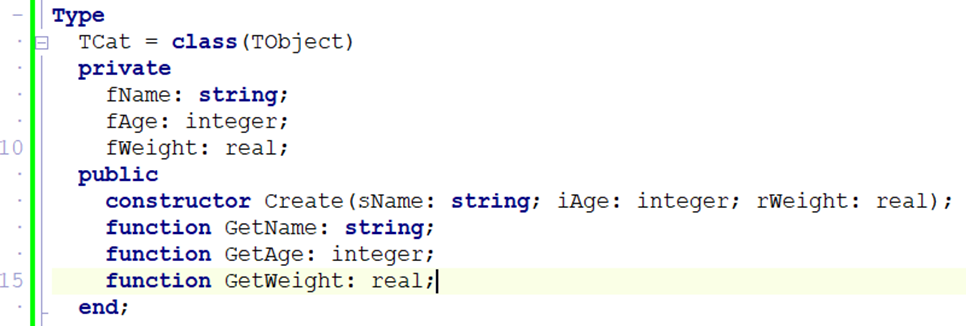
Core OOP Concepts
| Term | Definition |
|---|---|
| Class | A blueprint or template that describes what an object looks like and can do |
| Object | A specific instance of a class (like one particular cat — Whiskers) |
| Attribute | A variable that stores data about the object (e.g. fName, fAge) |
| Method | A procedure or function that belongs to the class (e.g. GetName, SetAge) |
| Constructor | Special method Create that creates an instance and sets initial values |
| Encapsulation | Hiding private data inside a class; only accessible through public methods |
| Inheritance | A new class inherits all attributes and methods of an existing (parent) class |
| Polymorphism | The same method name behaves differently in different classes |
In Delphi, every component is an object. TButton is a class; btnOK is an object. TForm is a class; Form1 is an object. OOP lets you create your own custom classes.
One Class, Many Objects
A class is defined once. You can create as many objects (instances) from it as you need — each with its own data.
UML Class Diagram
Before coding a class, design it using a UML (Unified Modeling Language) diagram — a rectangle divided into 3 sections.
Encapsulation
Keep attributes private — hidden from the outside world. Only expose them through controlled public methods (getters and setters). This protects data from accidental or invalid changes.
private
  fName: string;         // hidden from outside — direct access blocked
public
  procedure SetName(s: string);  // controlled write access (can include validation)
  function  GetName: string;     // controlled read access
Inheritance
A child class inherits all attributes and methods from a parent class, and can add or override its own. This avoids repeating code.
type
  TAnimal = class
    procedure Speak; virtual;  // can be overridden in child classes
  end;

  TDog = class(TAnimal)       // inherits everything from TAnimal
    procedure Speak; override;  // replaces TAnimal.Speak
  end;

  TCat = class(TAnimal)
    procedure Speak; override;
  end;
Polymorphism
The same method name (Speak) behaves differently depending on the type of object. "Many forms" — poly = many, morph = form.
| Object | Method Called | Result |
|---|---|---|
objAnimal.Speak | TAnimal.Speak | 'Animal sound...' |
objDog.Speak | TDog.Speak (overridden) | 'Woof!' |
objCat.Speak | TCat.Speak (overridden) | 'Meow!' |
procedure TAnimal.Speak;
begin
  ShowMessage('Animal sound...');
end;

procedure TDog.Speak;
begin
  ShowMessage('Woof!');
end;

procedure TCat.Speak;
begin
  ShowMessage('Meow!');
end;
Types of Methods
| Method Type | Keyword | Description |
|---|---|---|
| Constructor | constructor | Creates the object and sets initial attribute values. Called on the class name: TCat.Create(...) |
| Accessor (getter) | function | Returns the value of a private attribute. Read-only access. |
| Mutator (setter) | procedure | Updates the value of a private attribute. Can include validation. |
| ToString | function | Returns a string representation of the object's state — used for display. |
| Auxiliary | private | Internal helper methods used by other methods, not accessible from outside. |
An auxiliary method is a private helper that does one small job for an accessor or mutator, so that method doesn't get cluttered with extra logic. It takes the data it's given, processes it, and returns the result — it never changes the object's attributes itself. Using auxiliary methods reduces complexity inside a class and keeps each method focused on a single task.
private
  function FormatWeight(rWeight: real): string;  // auxiliary — helper only, not called from outside the class
public
  function ToString: string;

// ...
function TCat.FormatWeight(rWeight: real): string;
begin
  Result := FloatToStrF(rWeight, ffFixed, 4, 1) + 'kg';  // just formats — doesn't change fWeight
end;

function TCat.ToString: string;
begin
  Result := fName + ', ' + FormatWeight(fWeight);  // ToString calls the auxiliary method
end;
Common Exam Traps
A function returns a value and can be used inside an expression. A procedure performs an action and returns nothing. If the question says a routine "displays" something on screen, that's a procedure — displaying is not the same as returning.
A value parameter passes a copy — changes made to it disappear when the routine ends. A reference parameter (var in Delphi) passes the actual variable — changes persist in the calling code. Whenever a question says a routine must change two values and return them to the caller, you need reference parameters.
A syntax error breaks the rules of the language and won't compile. A logic error compiles and runs, but produces the wrong answer — the compiler can never find this one for you, which is exactly why trace tables exist. A runtime error crashes the program while it's running, e.g. division by zero or an array index out of bounds.
How to Create a Class in Delphi
- Go to File → New → Unit – Delphi to create a new blank unit.
- Save it in the same folder as your project (e.g.
UCar.pas). - Type the class structure in the
interfacesection (see template below). - Press Ctrl+Shift+C — Delphi auto-generates the method bodies in the
implementationsection. - Fill in the code inside each method body.
- In your main form unit, add the unit name to the
usesclause (e.g.uses ..., UCar;).
After writing the class declaration in the interface section, press Ctrl+Shift+C and Delphi automatically creates all the empty method implementations in the implementation section. You just fill in the code.
Complete Class Example — TCat
unit UCat;

interface

type
  TCat = class
  private
    fName   : string;
    fAge    : integer;
    fWeight : real;
  public
    constructor Create(sName: string; iAge: integer; rWeight: real);
    function    GetName   : string;
    function    GetAge    : integer;
    function    GetWeight : real;
    procedure   SetName(sNew: string);
    function    ToString  : string;
  end;

implementation

constructor TCat.Create(sName: string; iAge: integer; rWeight: real);
begin
  fName   := sName;
  fAge    := iAge;
  fWeight := rWeight;
end;

function TCat.GetName : string;
begin
  Result := fName;
end;

function TCat.GetAge : integer;
begin
  Result := fAge;
end;

function TCat.GetWeight : real;
begin
  Result := fWeight;
end;

procedure TCat.SetName(sNew: string);
begin
  fName := sNew;
end;

function TCat.ToString : string;
begin
  Result := fName + ', Age: ' + IntToStr(fAge)
          + ', Weight: ' + FloatToStr(fWeight) + 'kg';
end;

end.
Parameterised vs Non-Parameterised Constructors
A class can have more than one constructor. The one shown above — Create(sName: string; iAge: integer; rWeight: real) — is a parameterised constructor: it takes arguments and uses them to set the object's attributes immediately, at the moment the object is created.
A class can also have a non-parameterised constructor — just Create with no arguments — which creates the object with default/empty values instead, to be filled in later using the mutator methods:
constructor TCat.Create;
begin
  fName   := '';
  fAge    := 0;
  fWeight := 0;
end;
Parameterised Create(...) | Non-parameterised Create | |
|---|---|---|
| Values set | Immediately, from the arguments passed in | Default/empty — must be set afterwards |
| When you'd use it | You already know the object's details when creating it | You'll fill in the details later, or the user will type them in afterwards |
"Distinguish between the parameterised and non-parameterised constructor" wants exactly this — one sets real values straight away from arguments, the other creates an empty object with default values that gets filled in later.
Practice Example — TCar Class
This is the kind of class you will write in a Grade 12 exam. Study the pattern carefully — constructor, accessors, mutator, ToString.
unit UCar;

interface

type
  TCar = class
  private
    fMake  : string;    // e.g. 'Toyota'
    fYear  : integer;   // e.g. 2022
  public
    constructor Create(sMake: string; iYear: integer);
    function    GetMake  : string;
    function    GetYear  : integer;
    procedure   SetMake(sNewMake: string);
    function    ToString : string;
  end;

implementation

constructor TCar.Create(sMake: string; iYear: integer);
begin
  fMake := sMake;
  fYear := iYear;
end;

function TCar.GetMake : string;
begin
  Result := fMake;
end;

function TCar.GetYear : integer;
begin
  Result := fYear;
end;

procedure TCar.SetMake(sNewMake: string);
begin
  fMake := sNewMake;    // could add validation here (e.g. check not empty)
end;

function TCar.ToString : string;
begin
  Result := fMake + ' (' + IntToStr(fYear) + ')';
  // Output example: 'Toyota (2022)'
end;

end.
Using TCar in the Main Form
// 1. Add UCar to uses clause of the main form
uses
  ..., UCar;

// 2. Declare object variable (global or local)
var
  objCar : TCar;

// 3. Create the object — in a button click or FormCreate
objCar := TCar.Create('Toyota', 2022);

// 4. Read values using accessors
lblMake.Caption := objCar.GetMake;                 // 'Toyota'
lblYear.Caption := IntToStr(objCar.GetYear);       // '2022'
memOut.Lines.Add(objCar.ToString);                 // 'Toyota (2022)'

// 5. Update a value using mutator
objCar.SetMake('Honda');
lblMake.Caption := objCar.GetMake;                 // 'Honda'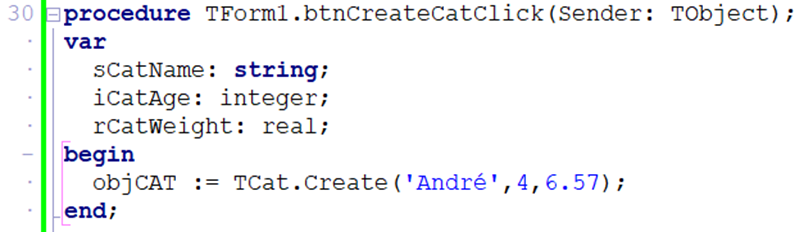
Always call Create before using any other method. The object does not exist until it is created. Also make sure the class unit name is in the uses clause of your main form.
Using a Class in the Main Form
uses
  ..., UCat;

var
  objCat : TCat;

// Create the object
objCat := TCat.Create('Whiskers', 3, 4.2);

// Use its accessors
lblName.Caption := objCat.GetName;           // 'Whiskers'
lblAge.Caption  := IntToStr(objCat.GetAge);  // '3'
memOut.Lines.Add(objCat.ToString);           // 'Whiskers, Age: 3, Weight: 4.2kg'

// Update via mutator
objCat.SetName('Felix');
lblName.Caption := objCat.GetName;           // 'Felix'
Worked Example — Methods with Logic (TLibraryBook)
The classes above only copy values in and out. Real tasks ask for methods that build, decide and calculate. We will use a new class, TLibraryBook, to practise each technique. A school library keeps a title, an author, the number of copies, a wear rating from 1 (like new) to 10 (falling apart) and the number of days a book may be borrowed.
type
  TLibraryBook = class
  private
    fBookID   : string;
    fTitle    : string;
    fAuthor   : string;
    fCopies   : integer;
    fWear     : integer;     // 1 = like new ... 10 = falling apart
    fLoanDays : integer;     // how many days it may be borrowed
    function GenerateID : string;   // auxiliary: only used inside the class
  public
    constructor Create(sBookID, sTitle, sAuthor: string; iCopies: integer);
    function    GetWear : integer;
    procedure   SetLoanDays(iDays: integer);
    procedure   RecordCheck(sResult: string);
    function    DueDate(dBorrowed: TDate) : TDate;
    function    IsAvailable : boolean;
    function    ToString : string;
  end;
Generating and Returning an ID
An ID is often built from pieces of other attributes. Copy(text, start, count) cuts out part of a string. To get the last two characters, start at Length(text) - 1 and copy 2. Numbers must be converted with IntToStr before they can be joined to text, and UpperCase makes the letters capitals. Here the ID is the first four letters of the title, the last two letters of the author, and the number of copies.
function TLibraryBook.GenerateID : string;
begin
  Result := UpperCase(Copy(fTitle, 1, 4) +
                      Copy(fAuthor, Length(fAuthor) - 1, 2)) +
            IntToStr(fCopies);
  // 'Long Walk to Freedom', 'Nelson Mandela', 3  gives  'LONGLA3'
end;
The function only returns the text through Result; it does not store it. Whoever calls it decides what to do with the answer.
A Constructor with Default Values and a Conditional ID
A constructor does not have to take a value for every attribute. Some attributes can simply start with a sensible default. It can also make decisions: below, a book that arrives with the ID 'None' is given a generated ID by calling the auxiliary method; a book that already has an ID keeps it.
constructor TLibraryBook.Create(sBookID, sTitle, sAuthor: string; iCopies: integer);
begin
  fBookID   := sBookID;
  fTitle    := sTitle;
  fAuthor   := sAuthor;
  fCopies   := iCopies;
  fWear     := 2;       // default: a new book is nearly like new
  fLoanDays := 14;      // default loan period

  if fBookID = 'None' then
    fBookID := GenerateID;   // ask the auxiliary method for an ID
end;GenerateID reads fTitle, fAuthor and fCopies. If you call it before those lines have run, it works with empty values and returns a wrong (or crashing) ID. Do the plain assignments first and the conditional step last.
A Mutator with a Rule
A mutator is not always a one-line assignment. It can change the attribute according to a rule: here a repair reduces the wear by 3 but never below the minimum of 1, and a report of damage sets the wear to the fixed value 10.
procedure TLibraryBook.RecordCheck(sResult: string);
begin
  if sResult = 'Repaired' then
  begin
    fWear := fWear - 3;
    if fWear < 1 then
      fWear := 1;                // never go below the minimum
  end;

  if sResult = 'Damaged' then
    fWear := 10;                 // special case: a fixed value
end;

procedure TLibraryBook.SetLoanDays(iDays: integer);
begin
  fLoanDays := iDays;
end;

function TLibraryBook.GetWear : integer;
begin
  Result := fWear;
end;
A Function That Returns a Date
A TDate is really a number: the count of days since a starting date, so adding a whole number to a date moves it forward by that many days. A method can therefore take a date in, add an attribute, and return the new date. The caller converts the returned date to text with DateToStr to display it.
function TLibraryBook.DueDate(dBorrowed: TDate) : TDate;
begin
  Result := dBorrowed + fLoanDays;
end;

// in the form:
dBorrowed := Date;                                      // today
lblDue.Caption := DateToStr(objBook.DueDate(dBorrowed));
A Boolean Helper Method
A method that answers a yes/no question returns a boolean. Combine the tests with and / or, and put each comparison in its own brackets.
function TLibraryBook.IsAvailable : boolean;
begin
  Result := (fCopies > 0) and (fWear < 8);   // a copy is left AND it is in fair condition
end;In Delphi and binds more tightly than > or <. Without the brackets, fCopies > 0 and fWear < 8 is read in the wrong order and will not compile. Bracket every comparison.
ToString with Line Breaks
A ToString that must show one fact per line joins the pieces with the character #13 (a carriage return). In a memo or RichEdit this starts a new line. A Windows line break is really the pair #13#10 (carriage return + line feed); use that pair when the text is going into a single Text property or message box, or when a plain #13 does not give a proper break.
function TLibraryBook.ToString : string;
begin
  Result := fTitle + ' [' + fBookID + ']' + #13 +
            'Author: ' + fAuthor + #13 +
            'Copies: ' + IntToStr(fCopies) + #13 +
            'Wear (1-10): ' + IntToStr(fWear) + #13 +
            'Loan period: ' + IntToStr(fLoanDays) + ' days';
end;
Calling the Methods from the Form — Procedure, Accessor, CASE, Mutator
A common pattern in the form is: call a procedure that changes the object, read the new state with an accessor, use that value as the selector of a case statement, and call a mutator in each branch. The ranges in the case use ...
procedure TfrmLibrary.btnCheckClick(Sender: TObject);
begin
  objBook.RecordCheck(edtResult.Text);        // 1. change the wear

  case objBook.GetWear of                   // 2. the accessor result picks the branch
    1..4  : objBook.SetLoanDays(21);        // 3. a mutator in every branch
    5..7  : objBook.SetLoanDays(14);
    8..10 : objBook.SetLoanDays(7);
  end;

  redOut.Lines.Clear;
  redOut.Lines.Add(objBook.ToString);         // 4. show the refreshed object
end;
Object Lifetime in the Form
When the object is created in one button and used in others, the object variable must be declared at form level (not inside one procedure) so every event can see it. Manage its lifetime in three places:
- FormCreate — set the variable to
nil: "no object exists yet". - Before replacing an object —
Freethe old one, set the variable tonil, then create the new one. If you skip theFree, the old object stays in memory with nothing pointing to it (a memory leak). - FormDestroy —
Freethe object and set the variable tonilwhen the form closes.
var
  objBook : TLibraryBook;          // form level: shared by all the events

procedure TfrmLibrary.FormCreate(Sender: TObject);
begin
  objBook := nil;
end;

procedure TfrmLibrary.btnAddClick(Sender: TObject);
begin
  objBook.Free;                   // release the old book (safe even when it is nil)
  objBook := nil;
  objBook := TLibraryBook.Create('None', edtTitle.Text, edtAuthor.Text, sedCopies.Value);
  redOut.Lines.Add(objBook.ToString);
end;

procedure TfrmLibrary.FormDestroy(Sender: TObject);
begin
  objBook.Free;
  objBook := nil;
end;If the user clicks the check button before any book has been created, objBook is still nil and objBook.RecordCheck(...) raises an access violation. Test with if objBook = nil then ShowMessage('Create a book first') before using it.
Dynamic Components — Creating Controls at Runtime
You already know that every Delphi control is an object of a class (a button is a TButton, a label is a TLabel). Because they are classes, you can create them in code while the program is running using the same Create constructor you use for your own classes — instead of dragging them onto the form at design time.
This is called creating a dynamic component. It is useful when you don't know in advance how many controls you need (e.g. one button per record loaded from a file).
The Four Steps
- Create the object from its class, passing the owner (usually the form).
- Set the Parent so Delphi knows where to draw it (which form/panel).
- Set properties like position, size and caption.
- Assign an event handler so it actually does something when clicked.
var
  btnDynamic : TButton;
begin
  // 1. Create the object (Form1 is the owner – frees it automatically)
  btnDynamic := TButton.Create(Form1);

  // 2. Set the Parent so it appears on the form
  btnDynamic.Parent := Form1;

  // 3. Set properties
  btnDynamic.Left    := 50;
  btnDynamic.Top     := 50;
  btnDynamic.Width   := 100;
  btnDynamic.Height  := 30;
  btnDynamic.Caption := 'Click Me';

  // 4. Assign an event handler (a procedure you wrote)
  btnDynamic.OnClick := btnDynamicClick;
end;

// The handler the button will run when clicked
procedure TForm1.btnDynamicClick(Sender: TObject);
begin
  ShowMessage('Dynamic button clicked!');
end;
Owner (the argument to Create) is responsible for freeing the component from memory when the form closes. Parent decides where on screen the component is drawn. They are usually the same form, but not always (e.g. Owner = Form, Parent = a Panel on that form).
If you create a component with Create(nil) (no owner), you must free it yourself with btnDynamic.Free; when you are done, otherwise it stays in memory. Passing the form as the owner lets Delphi clean up for you automatically.
2D Arrays Grade 12
A two-dimensional array stores data in a grid of rows and columns — like a table or spreadsheet. Each element is accessed using two indices: [row, column].
What is a 2D Array?
A two-dimensional (2D) array is a single variable that stores many values arranged in a grid of rows and columns. Where an ordinary (one-dimensional) array is like a single shopping list running down the page, a 2D array is like a whole spreadsheet — a block of cells where every value sits at the crossing point of a row and a column.
Analogy: think of a spreadsheet such as Excel. To find a cell you give a column letter and a row number — for example C5. A 2D array works exactly the same way, except we use two numbers: the first for the row and the second for the column. So myArray[2,3] means "the value in row 2, column 3", just like clicking one cell in a grid.
We use 2D arrays to store tables of data that naturally have rows and columns — for example a class register of marks where each row is a learner and each column is a subject, a seating plan, a noughts-and-crosses board, or temperatures recorded for each day across several weeks. One neat variable holds the whole table instead of dozens of separate variables.
Why Do We Use 2D Arrays?
- Related data stays together – instead of
mark1,mark2,mark3… you keep every mark in one organised grid. - Rows and columns have meaning – a row can represent one learner and a column one subject, so the position itself tells you what the value is.
- Loops do the heavy lifting – because the data is regular, two nested loops can fill, display or total the entire table in a few lines.
Declaration
Before you can use a 2D array you must declare it, telling Delphi how many rows and columns it has and what type of data each cell holds. You give two ranges in the square brackets: the first range is the rows and the second is the columns.
var
arrName : array [rowStart..rowEnd, colStart..colEnd] of DataType;var
myArray : array [1..2, 1..3] of Integer;The example above creates a grid with 2 rows and 3 columns, giving 6 integer cells in total. Note: the ranges can start at any number, but in CAPS we almost always start at 1 so that "row 1" really is the first row.
Visualising a 2D Array
The table below shows how the index numbers map onto the grid. Read it like a spreadsheet: pick a row down the side and a column across the top, and the cell where they meet is the array element you are referring to.
| Col 1 | Col 2 | Col 3 | |
|---|---|---|---|
| Row 1 | myArray[1,1] | myArray[1,2] | myArray[1,3] |
| Row 2 | myArray[2,1] | myArray[2,2] | myArray[2,3] |
Populating a 2D Array
Populating means putting values into the cells. There are two common ways: assigning each cell one by one (fine for a few known values), or using nested loops to fill the whole grid quickly.
Fixed values
Here we set each cell directly by naming its row and column. This is clear but tedious — imagine doing it for a 30 × 6 register. Use it only when you have a handful of specific values to place.
myArray[1,1] := 10;  myArray[1,2] := 20;  myArray[1,3] := 30;
myArray[2,1] := 40;  myArray[2,2] := 50;  myArray[2,3] := 60;
Nested FOR loops (most common)
This is the technique you will use most often. The outer loop moves through the rows; for each row the inner loop moves through every column. The result is that the inner loop runs completely for each turn of the outer loop, so the code visits every cell, one full row at a time — exactly like reading a spreadsheet left-to-right, then dropping down to the next line.
var
  myArray : array [1..3, 1..4] of Integer;
  r, c    : Integer;
begin
  for r := 1 to 3 do
    for c := 1 to 4 do
      myArray[r, c] := r * c;   // e.g. row 2, col 3 = 6
end;
Displaying a 2D Array
To show the grid neatly we again use nested loops, but this time we build up one line of text per row. For each row we start with an empty string, add every column value to it (padding each so the columns line up), and only then add the finished line to the memo. Important Rule: the line is built inside the inner loop but written out in the outer loop — that is what keeps each row on its own line.
var
  sLine, sNum: string;
  r, c:  Integer;
begin
  memOut.Clear;
  for r := 1 to 3 do
  begin
    sLine := '';
    for c := 1 to 4 do
    begin
      sNum := IntToStr(myArray[r,c]);
      while Length(sNum) < 5 do       // pad with spaces until 5 characters wide
        sNum := ' ' + sNum;
      sLine := sLine + sNum;
    end;
    memOut.Lines.Add(sLine);
  end;
end;Newer Delphi versions have a built-in .PadLeft() string helper that does this in one call, but it is not part of CAPS. The WHILE loop above achieves the same result — adding a space in front of the number until it is 5 characters wide — using only Length, string concatenation and a loop, all of which are already CAPS-examinable.
Building the Whole Grid as One String
Another way to display the grid is to build one long string that holds every row, and give it to a RichEdit in a single step. The outer loop handles the rows and the inner loop handles the columns. After each value we add a tab (#9) so the columns line up, and after each finished row we add a line break (#13#10). Here arrSales holds tuckshop sales (row = item, column = day) and iRows and iCols say how many rows and columns are in use.
var
  r, c          : Integer;
  sLine, sGrid  : string;
begin
  sGrid := '';                                   // the whole grid starts empty
  for r := 1 to iRows do
  begin
    sLine := '';                                 // each row starts a fresh line
    for c := 1 to iCols do
      sLine := sLine + IntToStr(arrSales[r, c]) + #9;   // value, then a tab
    sGrid := sGrid + sLine + #13#10;              // finished row, then a new line
  end;
  redGrid.Text := sGrid;                          // show everything at once
end;sGrid is cleared before both loops (once), sLine is cleared at the start of every row (inside the outer loop), and redGrid.Text is assigned after both loops. Clear sLine in the wrong place and the rows run into each other; assign the Text inside the loop and you only see the last row.
TStringGrid as an Alternative Display
The TStringGrid component (listed in the CAPS component list for Grades 11 and 12) shows a real table with cells and gridlines. You fill it cell by cell with the Cells property — but note that Cells takes the column first, then the row, the opposite order from your array. A new string grid has one fixed header row and one fixed header column at index 0, so the data for arrSales[r, c] fits neatly into Cells[c, r].
strSales.RowCount := iRows + 1;     // +1 for the fixed header row
strSales.ColCount := iCols + 1;     // +1 for the fixed header column
for r := 1 to iRows do
  for c := 1 to iCols do
    strSales.Cells[c, r] := IntToStr(arrSales[r, c]);   // [column, row]!
Calculations on 2D Arrays
A big reason for using a grid is to add things up. The trick is knowing which index to fix and which to vary. If you think of the class register again: a row total is one learner's marks added across all subjects, while a column total is one subject's marks added across all learners.
Row total
To total a single row we fix the row number (here row 1) and let the column index c change. The loop walks across that one row, adding each cell to a running total. This answers "what is everything in this row added together?" — for example one learner's total mark.
iTotal := 0;
for c := 1 to 4 do
  iTotal := iTotal + myArray[1, c];
Column total
Now we do the opposite: we fix the column number (here column 2) and let the row index r change. The loop runs straight down that one column, adding each cell. This answers "what is everything in this column added together?" — for example the total of all learners' marks for one subject.
iTotal := 0;
for r := 1 to 3 do
  iTotal := iTotal + myArray[r, 2];
Grand total of all elements
To add up every cell in the whole grid we need nested loops again — the outer loop for rows, the inner loop for columns — so the running total picks up each cell exactly once. This is how you would work out the grand total of all marks for the entire class across all subjects.
iTotal := 0;
for r := 1 to 3 do
  for c := 1 to 4 do
    iTotal := iTotal + myArray[r, c];
Worked Example — Class Register Report
A full exam question ties the pieces together: a 2D array of marks, a parallel 1D array of names, nested loops, and both a row and a column calculation. Here the grid arrMark holds marks for each learner (rows) across 4 subjects (columns), and arrName holds the matching learner names.
const
  LEARNERS = 5;
  SUBJECTS = 4;
var
  arrMark : array[1..LEARNERS, 1..SUBJECTS] of Integer;   // the grid: row = learner, col = subject
  arrName : array[1..LEARNERS] of string;              // parallel to the rows
arrName[r] is the name of the learner whose marks are in arrMark[r, 1..SUBJECTS] — the name array runs parallel to the rows of the grid.
Part (a) — Each learner's average (a row calculation)
Fix the row (one learner) and loop across the columns to total their subjects, then divide.
var
  r, c, iRowTotal : Integer;
  rAvg            : Real;
begin
  for r := 1 to LEARNERS do
  begin
    iRowTotal := 0;
    for c := 1 to SUBJECTS do
      iRowTotal := iRowTotal + arrMark[r, c];
    rAvg := iRowTotal / SUBJECTS;
    memOut.Lines.Add(arrName[r] + ': ' +
                     FloatToStrF(rAvg, ffFixed, 4, 1) + '%');
  end;
end;
Part (b) — The best subject (a column calculation + finding a max)
Now fix each column (one subject) and loop down the rows to average that subject across all learners, keeping track of the highest.
var
  r, c, iColTotal, iBestCol : Integer;
  rColAvg, rBestAvg         : Real;
begin
  iBestCol := 1;
  rBestAvg := 0;
  for c := 1 to SUBJECTS do
  begin
    iColTotal := 0;
    for r := 1 to LEARNERS do
      iColTotal := iColTotal + arrMark[r, c];
    rColAvg := iColTotal / LEARNERS;
    if rColAvg > rBestAvg then
    begin
      rBestAvg := rColAvg;
      iBestCol := c;               // remember WHICH subject
    end;
  end;
  ShowMessage('Best subject: column ' + IntToStr(iBestCol) +
              ' (average ' + FloatToStrF(rBestAvg, ffFixed, 4, 1) + '%)');
end;Row calculation → fix the row, loop the columns (one learner across all subjects). Column calculation → fix the column, loop the rows (one subject down all learners). To find a "best/worst", store the index as you go — that index links straight back to the parallel arrName.
Changing, Moving and Removing Elements
A 2D array is usually declared bigger than the data you currently have. Two counters, iRows and iCols, record how much of it is in use, and every loop runs to those counters — not to the declared size. The examples below all use this array of tuckshop sales:
const
  MAXROWS = 10;
  MAXCOLS = 5;
var
  arrSales     : array[1..MAXROWS, 1..MAXCOLS] of Integer;
  iRows, iCols : Integer;        // how many rows / columns are actually filled
  r, c, iTemp  : Integer;
Replace a single element
Name the row and column and assign the new value. Whatever was in that cell is overwritten.
arrSales[iRow, iCol] := iNewValue;Swap two specified elements
You cannot simply copy one cell onto the other, because the first value would be lost. Park it in a temporary variable first, exactly as when swapping two ordinary variables.
iTemp := arrSales[r1, c1];                // 1. save the first value
arrSales[r1, c1] := arrSales[r2, c2];     // 2. second value moves to the first cell
arrSales[r2, c2] := iTemp;                // 3. saved value goes into the second cell
Delete a row
A fixed-size array cannot actually get shorter — it keeps its capacity. To "delete" a row you copy every later row one position up, over the row being removed, and then reduce the occupied row count by one so the leftover last row is ignored. To delete row 3 of 6: row 4 is copied into row 3, row 5 into row 4, row 6 into row 5, and iRows becomes 5.
for r := iDelRow to iRows - 1 do       // stop one row early: r + 1 must still be in use
  for c := 1 to iCols do
    arrSales[r, c] := arrSales[r + 1, c];   // copy the next row up
Dec(iRows); // one row fewer in useIf the outer loop runs all the way to iRows, the last pass reads arrSales[iRows + 1, c], a row that is not in use — and if the array is full, one that does not exist at all, which crashes with a range error. Also work from the deleted row downwards, never upwards, or you copy over rows you have not moved yet.
Transpose a matrix into a second array
To transpose a grid is to turn its rows into columns. The cell at row r, column c in the original goes to row c, column r in the copy. Because the dimensions swap, a rectangular matrix needs a second array declared with the dimensions the other way round.
var
  arrFlip : array[1..MAXCOLS, 1..MAXROWS] of Integer;   // dimensions swapped
begin
  for r := 1 to iRows do
    for c := 1 to iCols do
      arrFlip[c, r] := arrSales[r, c];
  // arrFlip now uses iCols rows and iRows columns
end;| Original (2 rows × 3 columns) | Transposed (3 rows × 2 columns) |
|---|---|
| 10 20 30 40 50 60 | 10 40 20 50 30 60 |
Worked Example — Building Each Row from the Row Above
Some patterns are not typed in; they are calculated. Here we have a grid of 6 rows and 11 columns. Rows 1 and 2 are supplied. For every later row, each interior cell is the sum of the two diagonal neighbours above it — the cell in the previous row one column to the left, plus the cell in the previous row one column to the right. The first and last columns are never touched and stay 0.
| 1 | 2 | 3 | 4 | 5 | 6 | 7 | 8 | 9 | 10 | 11 | |
|---|---|---|---|---|---|---|---|---|---|---|---|
| Row 1 | 0 | 0 | 0 | 0 | 0 | 2 | 0 | 0 | 0 | 0 | 0 |
| Row 2 | 0 | 0 | 0 | 0 | 2 | 0 | 2 | 0 | 0 | 0 | 0 |
| Row 3 | 0 | 0 | 0 | 2 | 0 | 4 | 0 | 2 | 0 | 0 | 0 |
| Row 4 | 0 | 0 | 2 | 0 | 6 | 0 | 6 | 0 | 2 | 0 | 0 |
| Row 5 | 0 | 2 | 0 | 8 | 0 | 12 | 0 | 8 | 0 | 2 | 0 |
| Row 6 | 0 | 0 | 10 | 0 | 20 | 0 | 20 | 0 | 10 | 0 | 0 |
Check one cell by hand: row 3, column 6 = row 2 column 5 (which is 2) + row 2 column 7 (which is 2) = 4.
const
  ROWS = 6;
  COLS = 11;
var
  arrPat : array[1..ROWS, 1..COLS] of Integer;
  r, c   : Integer;
begin
  // clear every cell so the untouched edge columns really are 0
  for r := 1 to ROWS do
    for c := 1 to COLS do
      arrPat[r, c] := 0;

  // the two supplied rows
  arrPat[1, 6] := 2;
  arrPat[2, 5] := 2;
  arrPat[2, 7] := 2;

  // rows 3 to 6: top to bottom, interior columns only
  for r := 3 to ROWS do
    for c := 2 to COLS - 1 do
      arrPat[r, c] := arrPat[r - 1, c - 1] + arrPat[r - 1, c + 1];
end;Rows from 3 to ROWS, top to bottom: each row depends on the one above it, so the row above must already be finished when you reach it. Columns from 2 to COLS - 1: a cell in column 1 would need arrPat[r - 1, 0] and one in column 11 would need arrPat[r - 1, 12]; neither column exists, so those edge cells are skipped and keep their 0.
Recursion in Delphi Grade 12
Recursion is when a function or procedure calls itself repeatedly until a base condition is met. It is a powerful technique for problems that can be broken down into smaller versions of the same problem.
What is Recursion?
Recursion is when a function calls itself to solve a smaller version of the same problem, again and again, until the problem becomes so small it can be answered directly.
Analogy: picture a set of Russian nesting dolls. You open the biggest doll and find a smaller doll inside, open that and find a smaller one still, and you keep going until you reach the tiny doll that does not open. Recursion works the same way — each call opens up a slightly smaller version of the problem, and the smallest doll (the one that does not open) is the point where you stop.
A recursive routine is one that calls itself. Every recursive solution must have two parts:
- Base case — the condition that stops the recursion (essential — without it you get infinite recursion)
- Recursive case — the part where the function calls itself with a simpler input
A recursive function without a base case will call itself forever, causing a stack overflow error and crashing the program.
Example 1 — Factorial
Factorial of n (written n!) = n × (n-1) × (n-2) × … × 1. Example: 5! = 5 × 4 × 3 × 2 × 1 = 120
function Factorial(n: Integer): Integer;
begin
  if n <= 1 then           // base case: factorial of 0 or 1 is 1
    Result := 1
  else                      // recursive case
    Result := n * Factorial(n - 1);
end;

// Calling it:
lblResult.Caption := IntToStr(Factorial(5));  // = 120
Trace — how Factorial(4) executes
Factorial(4)
  = 4 * Factorial(3)
      = 3 * Factorial(2)
          = 2 * Factorial(1)
              = 1        ← base case reached
          = 2 * 1 = 2
      = 3 * 2 = 6
  = 4 * 6 = 24
Example 2 — Sum of 1 to N
function SumToN(n: Integer): Integer;
begin
  if n <= 0 then
    Result := 0           // base case
  else
    Result := n + SumToN(n - 1);  // recursive case
end;

// SumToN(4) = 4 + 3 + 2 + 1 + 0 = 10
Example 3 — Power (x to the power of n)
function PowerOf(base, exp: Integer): Integer;
begin
  if exp = 0 then
    Result := 1                            // base case: x^0 = 1
  else
    Result := base * PowerOf(base, exp - 1); // recursive
end;

// PowerOf(2, 4) = 2*2*2*2 = 16
Example 4 — Fibonacci Sequence
Each number is the sum of the previous two: 0, 1, 1, 2, 3, 5, 8, 13…
function Fibonacci(n: Integer): Integer;
begin
  if n <= 1 then
    Result := n                            // base cases: F(0)=0, F(1)=1
  else
    Result := Fibonacci(n - 1) + Fibonacci(n - 2);
end;
Recursion vs Iteration
| Recursion | Iteration (loop) | |
|---|---|---|
| How it works | Function calls itself | Loop repeats a block |
| Code clarity | Often more elegant for naturally recursive problems | Usually easier to trace and debug |
| Memory use | Uses call stack (risk of stack overflow for large n) | Constant memory use |
| Speed | Can be slower due to function call overhead | Generally faster |
| Best for | Tree traversal, divide-and-conquer algorithms | Simple counting and totalling |
Key Rules for Writing Recursive Functions
- Always define a base case that returns a value without calling itself
- Each recursive call must move toward the base case (e.g. decrease n by 1)
- Test with small values first — trace through manually
- Use a function (not procedure) so it can return a value
Grade 12 — Year Planner Grade 12
Based on the 2026 IT CAPS. Grade 12 introduces SQL (Term 1), OOP & 2D arrays (Term 2). Paper 2 is cumulative across all Grades 10–12.
This shows when each topic is taught during the year — it is not a list of what any single test covers. Any work done so far this year, plus the foundational work from earlier grades, can still be assessed, so don't study only the current term's topics.
Paper 1 (3 hrs): Delphi programming — SQL, OOP, 2D arrays, recursion, file handling, arrays, general programming.
Paper 2 (3 hrs): All theory from Gr10–12.
- SELECT, FROM, WHERE, ORDER BY, DISTINCT
- Calculated fields, aliases (AS)
- LIKE, IN, BETWEEN, IS NULL, wildcards, dates (#)
- Aggregate: SUM, MIN, MAX, AVG, COUNT, TOP
- GROUP BY and HAVING
- INSERT, UPDATE, DELETE
- SQL functions: ROUND, INT, LENGTH, LEFT, RIGHT, MID, FORMAT
- Date functions: DAY, MONTH, YEAR, DATE
- Joining tables using WHERE (single join)
- Parameterised queries (one parameter)
- All SQL via TADOQuery in Delphi
- Data collection: forms, RFID, cookies, transactions, loyalty cards
- Data warehousing vs databases
- Data mining: processes & practical examples
- Caring for data: validation, verification, integrity, access control
- Characteristics of a good database
- Referential integrity
- Database anomalies (insertion, deletion, modification)
- Normalisation: 1NF, 2NF, 3NF
- Mobile hardware & performance factors
- Mobile tech privacy implications (personal & business)
- Big Data, warehousing & mining: social implications
- OOP concepts: class, object, instance
- Non-parameterised & parameterised constructors
- Private attributes vs public methods
- Accessor (Get) methods
- Mutator (Set) methods
- Auxiliary methods
- ToString method
- Correct instantiation of objects
- 2D arrays: declaration & syntax
- Populating with nested FOR loops
- Row totals, column totals, element access
- Computer management: housekeeping, integrity, system protection
- Cloud computing: SaaS, advantages, hardware effects
- Artificial Intelligence (AI): uses, advantages, limitations
- VR: uses, hardware/software requirements, limitations
- AR & Mixed Reality: uses, hardware, limitations
- Virtualisation: uses & benefits
- Computer criminals: hackers, crackers, cyber gangs
- Types of cybercrime: identity theft, ransomware, phishing, botnets
- Effects of cybercrime
- Safeguards against cybercrime
- Past paper practice: full Paper 1 (2019–2025)
- Complex SQL (join + aggregate + GROUP BY)
- OOP multi-class scenarios
- 2D array exam scenarios
- Recursion varied problems & tracing
- File handling & CSV processing
- 1D array sort/search/parallel
- Semantic search, mediated search, SEO
- Online apps: cookies, PHP/JS/XML, CSS, AJAX
- Switch, cables, wireless base station
- Internet connections: fibre, Wi-Fi, 4G/5G, satellite
- Sharing files/folders, user rights, BitTorrent
- Remote access (LAN, Internet, VPN)
- SSL, public/private keys, digital certificates, firewall
- Review Gr11 data security (blockchain, encryption, MFA)
- Computers solving national/global problems
- Social networking evolution & its effects
- Privacy: cookies, anonymity, GUIDs, file sharing
- Q1: General programming (strings, loops, decisions)
- Q2: Arrays & text file handling
- Q3: OOP with multiple method types
- Q4: SQL + database programming (incl. join)
- Hardware, networks, internet (cumulative Gr10–12)
- Normalisation (1NF/2NF/3NF) — always appears
- Social implications & cybercrime
- Check Exam Extras for out-of-CAPS questions
Exam Extras Out-of-CAPS
These topics are not explicitly required by CAPS but have appeared in NSC past papers (2015–2024). Knowing them can mean the difference between a pass and a distinction.
Items marked P1 appear in Paper 1 (practical/Delphi), P2 in Paper 2 (theory), and Both in either paper. These are supplementary — master your CAPS content first.
The Software Development Process
CAPS never teaches "how to plan a whole program" as one topic — instead it hands you the individual planning tools (IPO tables, TOE charts, pseudocode) at different points across Grade 10 and 11. Strung together in order, those tools form a complete process for turning a vague idea into a finished, working program. None of this is examinable on its own, but following it will make your PAT — and any open-ended practical question — far less overwhelming.
- Pin down exactly what the program must do. A one-line description ("a till program") is not enough to start coding from — write out every input the program will receive, every calculation or decision it must make, and every output it must produce. This is the same information an IPO table asks for (Grade 10 T1, Algorithms & Problem Solving), just applied to the whole program instead of one calculation.
- Sketch the interface before placing a single component. Decide which forms the user will see, what components sit on each one, and how the user moves between them. Keep the same layout, colours and button placement on every form — a program that looks different from screen to screen feels unfinished even when the code is solid.
- Map out which event triggers which task. For every button, checkbox or form event, list precisely what must happen when it fires — this is exactly what a TOE (Task–Object–Event) chart is for (also covered on the Algorithms & Problem Solving page). Doing this before writing code stops the common mistake of half-remembering what a button was supposed to do halfway through typing its handler.
- Break the plan into procedures and functions before typing the body of any of them. Decide which pieces of logic will repeat, which need a return value and which don't, and what needs to pass between them as parameters — this is where the Procedures & Functions (Grade 11 T2) content and the local-vs-global variable rules on that page earn their keep.
- Write the code in small, testable pieces rather than the whole program at once — build and run after every procedure or two so that when something breaks, you know it's in the last few lines you typed, not buried somewhere in 200 lines you haven't tested yet.
- Test with data designed to break it, not just data that works. Run the program with an empty text box, a negative number, the largest and smallest values it should accept, and anything else a careless user might type — this is the mindset behind the Input Validation content (Grade 10 T2). Where something goes wrong before you can even see the output, Delphi's debugger (breakpoints, F8 stepping, the Watch List — see Data Types & Variables) will show you exactly which line is responsible.
A PAT is marked over months, revisited many times, and often built on by a partner or by future-you after a long break. Time spent planning up front — even just a page of notes on what each form does — is what makes it possible to pick the project back up in Term 4 and still understand your own Term 2 code.
Practical Extras — Paper 1 (Delphi)
These Delphi functions, components and techniques are not listed in CAPS but appear regularly in exam questions or are needed to solve exam problems efficiently.
StringReplace()
Replaces all or first occurrence of a substring within a string.
s := StringReplace(s, 'old', 'new', [rfReplaceAll]);
Format() function
Formats numbers/strings with precise control — Format('%.2f', [rVal]) gives 2 decimal places. More powerful than FloatToStrF.
Random() & Randomize()
Generate random integers. Always call Randomize; first to seed the generator. Random(100) returns 0–99.
TOpenDialog / TSaveDialog
Let users browse for files at runtime.
if OpenDialog1.Execute then sFile := OpenDialog1.FileName;
DateToStr() & StrToDate()
Convert between TDate values and string representation. Used with TDateTimePicker.
sDate := DateToStr(dtpDate.Date);
Try…Except…End (Exception Handling)
Catch runtime errors gracefully — e.g. invalid StrToInt input.
try iNum := StrToInt(edtNum.Text); except ShowMessage('Invalid'); end;
Memo.Lines.Count
Returns the number of lines in a Memo. Often used in loops to process all memo lines.
for i := 0 to Memo1.Lines.Count - 1 do
SameText() / CompareText()
Case-insensitive string comparison — avoids problems when user types 'yes', 'YES' or 'Yes'.
if SameText(sInput, 'yes') then
IntToHex() & HexToInt()
Convert integers to hexadecimal strings and back. Sometimes tested in conjunction with number systems theory.
sHex := IntToHex(255, 4); // = '00FF'
Odd() & Even() functions
Built-in boolean checks — cleaner than MOD 2.
if Odd(iNum) then // true if iNum is odd
Break & Continue in loops
Break stops the rest of the loop from processing. Continue skips the rest of the current pass and moves on to the next iteration. Both appear in exam solutions — know the difference. (Break vs Exit is taught on the Loops page.)
Theory Extras — Paper 2
These theory topics have appeared in NSC Theory papers but sit at the edge of or outside the formal CAPS scope. They typically appear in social implications or "current technology" questions.
Artificial Intelligence (AI) & Machine Learning
AI appears regularly in social implications questions — automation of jobs, AI decision-making, bias in AI, chatbots. Not deeply technical — understand the concept and its social effects.
Blockchain Technology
A distributed digital ledger of linked blocks. Used in cryptocurrency, supply chain, and secure records. Appeared in Gr12 theory papers. Know: what it is, how it works, and 2 uses.
Deep Fakes
AI-generated fake videos or audio that appear authentic. Social implications question topic — impacts on trust, truth, and politics. Know the definition and two risks.
Dark Web
A part of the internet not indexed by search engines, accessed via special software (Tor). Used for anonymity — legal and illegal uses. Appeared in theory cybercrime questions.
Net Neutrality
The principle that all internet traffic should be treated equally — ISPs cannot throttle or prioritise certain content. A social/political IT topic.
IPv6
The successor to IPv4 — uses 128-bit addresses (vs 32-bit) to solve address exhaustion. Format: 2001:0db8:85a3::8a2e:0370:7334. Know why it was introduced.
RAID Levels (0, 1, 5)
RAID 0: speed (striping, no redundancy). RAID 1: mirroring (exact copy). RAID 5: striping with parity (balance of speed + fault tolerance). CAPS only mentions RAID in general — exams go deeper.
Steganography
Hiding secret information within ordinary files (images, audio) without detection. Different from encryption — encryption scrambles data; steganography hides its existence. Appeared in theory questions.
Smart Contracts
Self-executing contracts where terms are written in code on a blockchain. No middlemen needed. Related to blockchain technology — appeared in Gr12 social implications.
Edge Computing
Processing data close to where it is generated (the "edge" of the network) rather than sending it all to a central cloud server. Reduces latency — important for IoT and 5G.
Bus Network Topology
All devices share a single communication line (the bus). Not in the current CAPS but appeared in older papers. Advantage: cheap. Disadvantage: single point of failure; performance drops with more devices.
Mesh Network Topology
Each device connects to several others, so data has more than one possible path. Not in the current CAPS (it sits under "network innovation"). Advantage: very reliable — traffic reroutes if a link fails. Disadvantage: expensive, many connections needed. It's how "mesh Wi-Fi" systems work.
Social Engineering
Manipulating people (rather than systems) to reveal confidential information. Includes pretexting, baiting, tailgating. Appears in cybercrime theory questions.
Number System Conversions
Exams frequently ask you to convert values — not just explain systems. Practise: decimal↔binary, decimal↔hex, binary↔hex. Know the place values (powers of 2 and 16).
POPIA (Protection of Personal Information Act)
South African law governing how personal data must be collected, stored, and protected. Appears in privacy and legal implications questions. Know: what it is, who it protects, and 2 requirements.
Cybercrimes Act (2020)
SA legislation that criminalises hacking, ransomware, online fraud, and malicious communications. Often referenced in cybercrime theory questions for Gr12.
Digital Twins
A virtual replica of a physical object or system, updated in real time from sensor data. Used in engineering, manufacturing, and smart cities. Appeared in 4IR/IoT questions.
Complete Delphi Functions Quick Reference
A comprehensive reference of all Delphi functions you need to know — both CAPS-required and commonly appearing in exams.
String Functions
| Function/Procedure | What it does | Example |
|---|---|---|
Length(s) | Returns number of characters | Length('Hello') = 5 |
Pos(find, source) | Position of substring (0 if not found) | Pos('lo','Hello') = 4 |
Copy(source, start, len) | Extract substring | Copy('Hello',2,3) = 'ell' |
Insert(text, var s, pos) | Insert text into string at position | Insert('!','Hello',6) → 'Hello!' |
Delete(var s, pos, len) | Remove characters from string | Delete(s,1,3) |
UpperCase(s) | All uppercase | UpperCase('hi') = 'HI' |
LowerCase(s) | All lowercase | LowerCase('HI') = 'hi' |
Trim(s) | Remove leading/trailing spaces | Trim(' Hi ') = 'Hi' |
StringReplace(s,old,new,flags) | Replace substring(s) | StringReplace(s,'a','e',[rfReplaceAll]) |
SameText(s1,s2) | Case-insensitive comparison (boolean) | SameText('Yes','yes') = True |
Concat(s1,s2) | Join two strings (same as +) | Concat('Hel','lo') |
s[i] | Character at index i (1-based) | s[1] = first character |
Math Functions
| Function | What it does | Example |
|---|---|---|
Sqr(x) | x squared (x²) | Sqr(4) = 16 |
Sqrt(x) | Square root | Sqrt(16) = 4 |
Power(base, exp) | base to the power of exp | Power(2,8) = 256 |
Round(x) | Round to nearest integer | Round(4.6) = 5 |
Trunc(x) | Remove decimal (truncate toward zero) | Trunc(4.9) = 4 |
Ceil(x) | Round UP to integer | Ceil(4.1) = 5 |
Floor(x) | Round DOWN to integer | Floor(4.9) = 4 |
Abs(x) | Absolute value | Abs(-5) = 5 |
Random(n) | Random integer 0 to n-1 | Random(6)+1 simulates a die |
Randomize | Seed the random generator (call once) | Call before Random() |
Inc(x) / Inc(x,n) | Increment by 1 or n | Inc(i) ≡ i := i+1 |
Dec(x) / Dec(x,n) | Decrement by 1 or n | Dec(i,3) ≡ i := i-3 |
Odd(n) | True if n is odd | Odd(3) = True |
Pi | Returns π (3.14159…) | rArea := Pi * Sqr(r) |
Type Conversion Functions
| Function | Converts | Example |
|---|---|---|
StrToInt(s) | String → Integer | StrToInt('42') = 42 |
StrToFloat(s) | String → Real | StrToFloat('3.14') |
StrToIntDef(s, default) | String → Integer (safe — returns default if invalid) | StrToIntDef(edtNum.Text, 0) |
IntToStr(n) | Integer → String | IntToStr(42) = '42' |
FloatToStr(r) | Real → String | FloatToStr(3.14) |
FloatToStrF(r, fmt, digits, dec) | Formatted real → String | FloatToStrF(r, ffFixed, 6, 2) |
Ord(c) | Char → Integer (ASCII value) | Ord('A') = 65 |
Chr(n) | Integer → Char | Chr(65) = 'A' |
UpCase(c) | Single char to uppercase | UpCase('a') = 'A' |
IntToHex(n, digits) | Integer → Hex string | IntToHex(255,2) = 'FF' |
DateToStr(d) | TDate → String | DateToStr(Now) |
FormatFloat(fmt, r) | Real → formatted string | FormatFloat('#,##0.00', 1234.5) |
Past Paper Patterns & Tips
Paper 1 (Practical) — What Always Appears
| Section | What to expect | Common traps |
|---|---|---|
| Q1: General programming | Strings, loops, decisions, calculations (~30–40 marks) | Off-by-one errors in loops; forgetting to initialise variables |
| Q2: Arrays & files | 1D/2D arrays, text file reading/writing (~20–25 marks) | Using wrong index (0 vs 1-based); not closing file |
| Q3: OOP | Class with constructor, accessors, mutators, toString (~25–30 marks) | Calling Create on the object var (not class name); forgetting Result in functions |
| Q4: Database/SQL | TADOQuery, SQL statements including JOIN (~20–25 marks) | Not calling qry.Close before changing SQL; wrong JOIN ON condition |
| Recursion (Gr12) | Write a recursive function; trace it (~10–15 marks) | Missing base case; not returning Result |
Paper 2 (Theory) — What Always Appears
| Topic | Typical mark allocation | What examiners look for |
|---|---|---|
| Hardware & software | 15–20 marks | Specific advantages/disadvantages; real-world examples |
| Networks & internet | 20–25 marks | Correct terminology; topology advantages/disadvantages |
| Databases & normalisation | 20–30 marks | Correct normal form identification; proper primary/foreign key use |
| Social implications | 20–25 marks | Balance of positive AND negative effects; specific examples |
| Cybercrime | 10–15 marks (Gr12) | Correct crime type names; effects on both victim and business |
| Current technology (IoT, AI, VR) | 10–15 marks (Gr12) | Practical application examples; social implications |
General Exam Advice
- Read the question twice — and write your Paper 2 answers in sentences or short paragraphs, never bullet points, whatever the command word is. Markers only credit the first few bullets, but they must read a whole paragraph
- Never leave a practical question blank — partial marks are awarded for correct structure
- In SQL: always check your WHERE condition matches the question's criteria exactly
- In OOP: write the constructor first — it sets up all the attributes you'll use elsewhere
- In theory: "advantage AND disadvantage" means you need both for full marks