Grade 11 Practical Study Reference
A printable guide to the practical Delphi programming for Grade 11 (Paper 1 skills), with the year planner and exam extras.
Contents — Grade 11 Practical
- Practical
- 1D Arrays
- Text Files
- Procedures & Functions
- Databases in Delphi
- Term Planner
- Grade 11 - By Term
- Exam Resources
- Exam Extras (Out-of-CAPS)
1D Arrays Grade 11
Imagine you need to store 30 student marks. Without arrays you would need 30 separate variables — iMark1, iMark2, … iMark30. With an array, one name stores them all: arrMarks[1..30]. Arrays are a Grade 11 Term 1 topic.
Why Use Arrays?
What is a 1D Array?
A one-dimensional array is a structured data type that stores a fixed number of values of the same data type under a single variable name, with each individual value accessed using its own index (a whole number giving that value's position in the list).
Think of an array like a train: each carriage (box) holds one value and is numbered by its index — the index tells you exactly where to find that value.
Remember a single variable is one cup. An array is a whole matching dinner set — say 6 cups — that all share one name and are numbered: arrCups[1], arrCups[2] … arrCups[6]. Every item is the same type (all cups), just at a different index (place-setting number).
So instead of naming 30 separate cups cup1, cup2, …, you keep one name and pick the one you want by its number: arrMarks[7] is simply "the mark at place setting 7".
Declaring an Array
arrName : array [lowerIndex..upperIndex] of DataType;var
arrNames : array [1..30] of String;
arrMarks : array [1..30] of Integer;
arrPrices : array [0..9] of Real;Arrays of Unknown Length — use a constant
You don't always know in advance exactly how many items you will store. A common trick is to declare a constant for the maximum size, then use it as the upper index. If the size needs to change later, you only edit one line.
The constant must be declared above the array declaration (it can go just above type in the interface section), otherwise Delphi won't know what Max means yet.
const
  Max = 100;                          // maximum possible learners
var
  arrNames : array [1..Max] of String;
  iCount   : Integer;                  // how many are ACTUALLY used
Keep a separate counter (iCount) for how many elements are really in use, and loop 1 to iCount instead of 1 to Max.
Dynamic Arrays
A dynamic array has no fixed size when declared — you set (and can later change) its length while the program runs with SetLength. This is perfect when the number of items is only known at runtime (e.g. after reading a file).
Unlike array[1..30], a dynamic array is always 0-based. If you SetLength(arr, 5) the valid indexes are 0,1,2,3,4. Use Low(arr) for the first index (0) and High(arr) for the last (length − 1).
| Routine | Purpose |
|---|---|
SetLength(arr, n) | Sets (or changes) the array to hold n elements |
Length(arr) | Returns the current number of elements |
Low(arr) | First valid index (always 0 for dynamic arrays) |
High(arr) | Last valid index (Length − 1) |
var
  arrNum : array of Integer;   // note: NO index range given
  i : Integer;
begin
  SetLength(arrNum, 5);          // now holds 5 ints, index 0..4

  for i := Low(arrNum) to High(arrNum) do
    arrNum[i] := i * 2;           // 0, 2, 4, 6, 8

  SetLength(arrNum, 8);          // grow to 8 — existing values are kept
end;
Populating an Array
Method 1: Fixed values
arrNames[1] := 'Alice';
arrNames[2] := 'Bob';
arrNames[3] := 'Callie';
Method 2: Constant array (known at compile time)
const
  arrDays : array [1..7] of String =
    ('Mon', 'Tue', 'Wed', 'Thu', 'Fri', 'Sat', 'Sun');
Method 3: User input with a loop
for i := 1 to 30 do
  arrNames[i] := InputBox('Name', 'Enter name:', '');
Displaying & Calculating
// Display all
for i := 1 to Length(arrMarks) do
  memOut.Lines.Add(IntToStr(arrMarks[i]));

// Sum and average
iTotal := 0;
for i := 1 to Length(arrMarks) do
  iTotal := iTotal + arrMarks[i];
rAvg := iTotal / Length(arrMarks);
Shortcut: the Math Unit
Writing your own loop to total or average an array works, but Delphi's Math unit already has ready-made functions that do the same job in one line.
| Function | Returns |
|---|---|
Sum(arr) | Total of every element |
Mean(arr) | Average of every element |
MaxValue(arr) | The largest value in the array |
MinValue(arr) | The smallest value in the array |
uses Math;   // add this to the uses clause first

rAvg     := Mean(arrPrices);
rTotal   := Sum(arrPrices);
rHighest := MaxValue(arrPrices);
rLowest := MinValue(arrPrices);These four functions only accept an array whose elements are declared as Double — not Integer, and not the general-purpose Real. If your array holds integers, either redeclare it as array[1..n] of Double, or stick to your own loop.
Arrays with Meaningful Indices
Every index used so far has just meant "the Nth item in the list" — arrNames[3] is simply whoever happens to be third. Sometimes, though, it's more useful to let the index itself carry meaning. If arrVotes[4] always holds the vote count for competitor number 4, the index is the competitor number, not just a position in a queue.
Using a Char as the Index
An index isn't limited to whole numbers — any ordinal type can be used, including Char. This is handy whenever the letter itself is what you want to look values up by, e.g. tallying how many learners scored each grade symbol (A to F) in a test:
var
  arrSymbolCount : array ['A'..'F'] of Integer;
  cGrade : Char;
begin
  cGrade := 'A';
  while cGrade <= 'F' do
  begin
    arrSymbolCount[cGrade] := 0;   // reset every element to zero first
    cGrade := succ(cGrade);         // moves 'A' to 'B', 'B' to 'C', and so on
  end;

  // later, whenever a learner's symbol is worked out:
Inc(arrSymbolCount[cLearnerSymbol]);succ(cGrade) gives the character that comes after cGrade in the alphabet; pred(cGrade) gives the one before it. They work like +1/-1 for any ordinal type, including Char, where plain arithmetic isn't allowed.
Matching a RadioGroup's ItemIndex to an Array
A RadioGroup's ItemIndex always starts counting from 0 for its first button — but an array you declare yourself might start at 1. When you use ItemIndex to pick an element to update (for example, tallying votes for a menu option), you need to decide which convention your array follows and stay consistent:
Array declared [0..4] | Array declared [1..5] |
|---|---|
iChoice := rgpMenu.ItemIndex;Inc(arrVotes[iChoice]); |
iChoice := rgpMenu.ItemIndex + 1;Inc(arrVotes[iChoice]); |
With the [1..5] version, the array index is always one more than ItemIndex, because ItemIndex itself never moves off its 0-based counting — only your array's lower bound changes.
Delphi will happily compile arrNames[50] even if arrNames was declared as [1..30] — the mistake only surfaces while the program is running, as a range-check/IndexOutOfBounds error the moment that line executes. Whenever an index comes from user input or from a component like ItemIndex, validate it against the array's real bounds before using it.
Frequency Arrays — Counting With Ord
Every character has a numeric code. Ord(c) gives the code of a character and Chr(n) turns a code back into a character. A few codes worth knowing:
| Character | Code |
|---|---|
' ' (space) | 32 |
'0' to '9' | 48 to 57 |
'A' to 'Z' | 65 to 90 |
'a' to 'z' | 97 to 122 |
Because the code is a whole number, it can be used directly as an index. A frequency array keeps one counter per possible character, and the character's code decides which counter to add to. No searching is needed — the character takes you straight to its own counter.
var
  arrFreq : array [0..127] of Integer;
  sText   : string;
  i       : Integer;
begin
  sText := 'Mzansi';
  for i := 0 to 127 do
    arrFreq[i] := 0;                         // every counter starts at zero
  for i := 1 to Length(sText) do
    Inc(arrFreq[Ord(sText[i])]);            // the code picks the counter

  for i := 0 to 127 do
    if arrFreq[i] > 0 then
      memOut.Lines.Add(Chr(i) + ': ' + IntToStr(arrFreq[i]));
end;The array above only has room for codes 0 to 127. A character with a bigger code (for example some accented letters) would index outside the array and cause a range error. This pattern is meant for plain English text.
Letters Only: Ord(c) − Ord('A')
If you only care about the 26 letters, a 0..127 array wastes space. Convert to capitals first, then subtract the code of 'A' so that A becomes index 0, B becomes 1, and Z becomes 25. To display, reverse the calculation with Chr(Ord('A') + i).
var
  arrLetters : array [0..25] of Integer;
  sText : string;
  cCh   : Char;
  i     : Integer;
begin
  sText := UpperCase('Springbok rugby');
  for i := 0 to 25 do
    arrLetters[i] := 0;
  for i := 1 to Length(sText) do
  begin
    cCh := sText[i];
    if cCh IN ['A'..'Z'] then                  // ignore spaces and symbols
      Inc(arrLetters[Ord(cCh) - Ord('A')]);
  end;
  for i := 0 to 25 do
    if arrLetters[i] > 0 then
      memOut.Lines.Add(Chr(Ord('A') + i) + ' = ' + IntToStr(arrLetters[i]));
end;
Anagram Check (Balance Array)
Two words are anagrams when they use exactly the same letters the same number of times (ALERT and ALTER). Use one 26-slot array as a balance sheet: add 1 for every letter of the first word, subtract 1 for every letter of the second. If the words are anagrams, every slot ends on 0. Assume both words are already in capitals with no spaces.
var
  arrBalance : array [0..25] of Integer;
  sOne, sTwo : string;
  i : Integer;
  bAnagram : Boolean;
begin
  sOne := 'ALERT';
  sTwo := 'ALTER';
  for i := 0 to 25 do
    arrBalance[i] := 0;
  for i := 1 to Length(sOne) do
    Inc(arrBalance[Ord(sOne[i]) - Ord('A')]);
  for i := 1 to Length(sTwo) do
    Dec(arrBalance[Ord(sTwo[i]) - Ord('A')]);

  bAnagram := True;
  for i := 0 to 25 do
    if arrBalance[i] <> 0 then
      bAnagram := False;
end;
Pangram Check (Seen Array)
A pangram is a sentence that contains every letter of the alphabet at least once. Use a Boolean array with one slot per letter, all starting at False. Every time you meet a letter, switch its slot to True. Repeating a letter does not help you fill in a missing one, so the sentence is a pangram only if all 26 slots end up True.
var
  arrSeen : array [0..25] of Boolean;
  sLine : string;
  cCh : Char;
  i : Integer;
  bPangram : Boolean;
begin
  sLine := 'Pack my box with five dozen liquor jugs.';
  for i := 0 to 25 do
    arrSeen[i] := False;
  for i := 1 to Length(sLine) do
  begin
    cCh := UpCase(sLine[i]);
    if cCh IN ['A'..'Z'] then
      arrSeen[Ord(cCh) - Ord('A')] := True;
  end;

  bPangram := True;
  for i := 0 to 25 do
    if not arrSeen[i] then
      bPangram := False;
end;Counting letters, comparing two words and checking for a full alphabet all use the same trick: Ord(letter) - Ord('A') turns a letter into an array index. None of these need sorted data.
Linear Search
bFound := False;
for i := 1 to Length(arrNames) do
  if arrNames[i] = sSearch then
  begin
    ShowMessage('Found at position ' + IntToStr(i));
    bFound := True;
    Break;
  end;
if not bFound then
ShowMessage('Not found');The code above stops the loop with Break as soon as one match turns up — correct when you only expect a single match (e.g. one learner's ID number). If instead you needed every occurrence (e.g. every learner who chose "Physics"), you would drop the flag and Break, and simply let the loop run to the end, adding each match found along the way. Once the array is sorted, binary search (below) beats both approaches for speed.
Linear Search Without a Flag (Position 0 = Not Found)
You can also do a search without a Boolean variable at all. Array positions start at 1, so 0 can never be a real position. That makes 0 a perfect way to say "nothing found yet". Set the answer to 0, and only save a position if the answer is still 0 — this keeps the first match even though the loop runs to the end.
iPos := 0;
for i := 1 to iCount do
  if (arrNames[i] = sSearch) and (iPos = 0) then
    iPos := i;

if iPos > 0 then
  ShowMessage(sSearch + ' is at position ' + IntToStr(iPos))
else
  ShowMessage('Not found');
Neither linear search version needs the array to be sorted.
Binary Search (sorted array)
Binary search is much faster than linear — it halves the search range each step. The array must be sorted first. We are searching for 23 in the array [2, 5, 8, 12, 16, 23, 38, 56, 72, 91].
iLow := 1;
iHigh := Length(arrNums);
bFound := False;
while (iLow <= iHigh) and not bFound do
begin
  iMid := (iLow + iHigh) div 2;
  if arrNums[iMid] = iTarget then
    bFound := True
  else if arrNums[iMid] < iTarget then
    iLow := iMid + 1
  else
    iHigh := iMid - 1;
end;
if bFound then
  ShowMessage('Found at position ' + IntToStr(iMid));
How String Comparison Works
Sorting a string array with > and < only makes sense once you know what Delphi is actually comparing. It never looks at "the alphabet" directly — it walks each string letter by letter and compares the underlying ASCII value of each character, stopping at the first pair of letters that differ.
| Comparison | Result | Why |
|---|---|---|
'Alice' = 'alice' | False | 'A' is ASCII 65, 'a' is ASCII 97 — string comparison is case-sensitive. |
'Bob' < 'Eve' | True | First letters differ straight away: 'B' (66) is less than 'E' (69). |
'Farai' < 'Farm' | True | The first three letters ('F','a','r') match, so the 4th letter decides: 'a' (97) is less than 'm' (109). |
'Gio' > 'Gi' | True | Delphi pads the shorter string with trailing spaces to compare them — so 'Gi' becomes 'Gi ', and 'o' (111) beats a space (32). |
Because every uppercase letter has a lower ASCII value than every lowercase letter, an unsorted mix of cases will group all the capitalised words before any lowercase word once sorted — not what most people expect from "alphabetical order". If that matters, convert both sides to the same case (e.g. with UpperCase()) before comparing or sorting.
Bubble Sort — Pass by Pass
Bubble sort compares adjacent elements and swaps them if they are in the wrong order. After each full pass, the largest unsorted value "bubbles" to its correct position at the end. Array: [5, 3, 8, 1, 9] — sorting ascending.
for i := Length(arrNums) - 1 downto 1 do
  for j := 1 to i do
    if arrNums[j] > arrNums[j + 1] then
    begin
      iTemp := arrNums[j];
      arrNums[j] := arrNums[j + 1];
      arrNums[j + 1] := iTemp;
end;The version above always completes every single pass, even once the array is already sorted. A smarter bubble sort keeps a Boolean flag and quits the moment a whole pass goes by with no swaps at all — because that can only happen when the array is fully sorted:
iEndCounter := Length(arrNums) - 1;
repeat
  bSwapped := False;
  for j := 1 to iEndCounter do
    if arrNums[j] > arrNums[j + 1] then
    begin
      iTemp := arrNums[j];
      arrNums[j] := arrNums[j + 1];
      arrNums[j + 1] := iTemp;
      bSwapped := True;
    end;
  Dec(iEndCounter);            // the tail end is sorted, so search one less item next time
until not bSwapped;         // no swaps this pass = fully sorted, stop looping
Selection Sort — Pass by Pass
Selection sort finds the smallest remaining element and swaps it into its correct position. Same array: [5, 3, 8, 1, 9].
for i := 1 to Length(arrNums) - 1 do
begin
  iMin := i;
  for j := i + 1 to Length(arrNums) do
    if arrNums[j] < arrNums[iMin] then
      iMin := j;
  if iMin <> i then
  begin
    iTemp := arrNums[i];
    arrNums[i] := arrNums[iMin];
    arrNums[iMin] := iTemp;
  end;
end;
Parallel Arrays
Two arrays are parallel when the same index refers to the same "record" — e.g. arrNames[3] and arrMarks[3] both belong to the same student. When you sort one, you must sort both to keep them in sync.
At a table, each person has their own cup, plate and bowl — three parallel dinner sets, where place setting [3] in each belongs to the same person. If that person moves to a different seat, they take all three of their things with them — you never leave their cup behind while their plate moves.
Sorting parallel arrays works exactly the same way: whenever the sort swaps two items in arrNames, you must swap the same two indexes in arrMarks (and every other parallel array) — so each student keeps their own name and their own mark together.
for i := 1 to Length(arrNames) - 1 do
  for j := i + 1 to Length(arrNames) do
    if arrNames[i] > arrNames[j] then
    begin
      // Swap both arrays at the same time
      sTemp := arrNames[i]; arrNames[i] := arrNames[j]; arrNames[j] := sTemp;
      iTemp := arrMarks[i]; arrMarks[i] := arrMarks[j]; arrMarks[j] := iTemp;
    end;
Inserting, Deleting, Removing Duplicates and Merging
An array of fixed size cannot really "grow" or "shrink", so these algorithms work with a count variable (iCount) that says how many slots are actually in use. The array is declared bigger than you need (for example array[1..Max]), and everything after position iCount is simply ignored. Always loop to iCount, never to Max.
Insert an Element at a Position
To squeeze a value into the middle, you first have to make a gap. Shift the elements to the right, starting from the end. If you started at the front you would copy the same value over and over and destroy the data.
- Make sure there is spare room (
iCount < Max). - Loop from
iCountdown to the insert position, copying each element one place to the right. - Put the new value in the gap.
- Increase the count with
Inc(iCount).
if iCount < Max then
begin
  for i := iCount downto iPlace do
    arrScores[i + 1] := arrScores[i];    // shift right, last element first
  arrScores[iPlace] := iNew;                // drop the new value into the gap
  Inc(iCount);
end;
// with iPlace = 3 and iNew = 70 the used part is now [45, 62, 70, 78, 90]
Delete an Element
Deleting works in the opposite direction. Shift everything after the deleted position one place to the left, starting from the front, so the next value overwrites the one you are removing. Then reduce the count.
for i := iPlace to iCount - 1 do
  arrScores[i] := arrScores[i + 1];      // shift left, first element first
Dec(iCount);
// with iPlace = 2 the used part is now [45, 70, 78, 90]Insert shifts right, from the end (downto). Delete shifts left, from the front (to). Mixing the directions overwrites values you still need. Also remember the count: forgetting Inc(iCount) or Dec(iCount) means your later loops will miss the new value or show a leftover one.
Remove Duplicates Into a Second Array
Instead of deleting from the original, build a second array that only receives a value if it is not already in there. For each value in the original, search the new array. If it was not found, append it.
iNewCount := 0;
for i := 1 to iCount do
begin
  bDuplicate := False;
  for j := 1 to iNewCount do
    if arrNew[j] = arrRoutes[i] then
      bDuplicate := True;
  if not bDuplicate then
  begin
    Inc(iNewCount);
    arrNew[iNewCount] := arrRoutes[i];
  end;
end;
The first occurrence of each value is kept, and the original order is preserved. Make sure arrNew is declared big enough to hold as many values as the original. The data does not need to be sorted.
Merge Two Arrays (Concatenate)
Joining two arrays end to end is simple: copy the first one into the result, then copy the second one starting just after it. The result is not sorted — it is just list A followed by list B.
for i := 1 to iCountA do
  arrC[i] := arrA[i];
for i := 1 to iCountB do
  arrC[iCountA + i] := arrB[i];
iCountC := iCountA + iCountB;
Merge Two Sorted Arrays (Result Stays Sorted)
If both arrays are already sorted ascending, you can merge them into one sorted array without sorting again. Keep one position marker per input array (i for A, j for B) and one for the result (k). Compare the two values the markers point at, copy the smaller one and move only that marker forward. When one array runs out, copy whatever is left of the other.
| Step | A[i] | B[j] | Copied to result |
|---|---|---|---|
| 1 | 3 | 4 | 3 (A is smaller) |
| 2 | 8 | 4 | 4 |
| 3 | 8 | 9 | 8 |
| 4 | 15 | 9 | 9 |
| 5 | 15 | 20 | 15 — A is now finished |
| left over | – | 20, 25 | 20, 25 |
i := 1;  j := 1;  k := 0;
while (i <= iCountA) and (j <= iCountB) do
begin
  Inc(k);
  if arrA[i] <= arrB[j] then
  begin
    arrC[k] := arrA[i];
    Inc(i);
  end
  else
  begin
    arrC[k] := arrB[j];
    Inc(j);
  end;
end;

// only one of these two loops will actually run
while i <= iCountA do
begin
  Inc(k);
  arrC[k] := arrA[i];
  Inc(i);
end;
while j <= iCountB do
begin
  Inc(k);
  arrC[k] := arrB[j];
  Inc(j);
end;
// arrC = [3, 4, 8, 9, 15, 20, 25]| Algorithm | Needs sorted data? |
|---|---|
| Linear search (with or without a flag) | No |
| Binary search | Yes |
| Insert at a given position, delete at a given position | No (insert at the correct position to keep an already-sorted array sorted) |
| Remove duplicates (second array method) | No |
| Concatenate two arrays | No (and the result is not sorted) |
| Merge two sorted arrays | Yes — both inputs must be sorted the same way |
| Frequency, anagram and pangram arrays | No |
Date Methods (Grade 11)
Delphi has built-in functions for working with dates — required for Grade 11 Term 1.
IsLeapYear, YearOf, MonthOf and DayOf live in the DateUtils unit. Add uses DateUtils; near the top of your unit, or Delphi will report "undeclared identifier" when you try to use them.
| Function | Returns | Example & Output |
|---|---|---|
Now | Current date & time (TDateTime) | lblDate.Caption := DateToStr(Now) → '2025/05/30' |
DateToStr(d) | Date as formatted string | DateToStr(dtpBirth.Date) → '2008/03/15' |
TimeToStr(t) | Time as formatted string | TimeToStr(Now) → '14:32:07' |
StrToDate(s) | String → TDateTime | StrToDate('2024/05/01') |
IsLeapYear(y) | Boolean (True/False) | IsLeapYear(2024) → True |
YearOf(d) | Integer year | YearOf(dtpDate.Date) → 2025 |
MonthOf(d) | Integer month (1–12) | MonthOf(Now) → 5 |
DayOf(d) | Integer day (1–31) | DayOf(Now) → 30 |
// Display today's date
lblToday.Caption := DateToStr(Now);         // '2025/05/30'

// Calculate age in years
iAge := YearOf(Now) - YearOf(dtpBirth.Date); // e.g. 17

// Check leap year
if IsLeapYear(YearOf(Now)) then
  ShowMessage('This is a leap year')
else
  ShowMessage('Not a leap year');
The Leap Year Rule Done By Hand
Sometimes you are asked to work without IsLeapYear. A year is a leap year when it is divisible by 400, or it is divisible by 4 but not by 100. So 2024 and 2000 are leap years; 1900 and 2026 are not.
bLeap := (iYear mod 400 = 0) or
         ((iYear mod 4 = 0) and (iYear mod 100 <> 0));
Age From a Birth Date
Subtracting the two years, as in the quick example above, is only approximately right. It gives the age the person will be some time this year. If the birthday has not happened yet this year, the real age is one less. A birthday has not been reached when today's month is before the birth month, or the months are equal but today's day is before the birth day.
iAge := YearOf(dtToday) - YearOf(dtBorn);
if (MonthOf(dtToday) < MonthOf(dtBorn)) or
   ((MonthOf(dtToday) = MonthOf(dtBorn)) and (DayOf(dtToday) < DayOf(dtBorn))) then
  Dec(iAge);                  // birthday still to come this year
// born 12 Aug 2008, today 3 May 2026:  2026 - 2008 = 18, birthday not reached, so 17
Days Between Two Dates Without Date-Difference Routines
The idea: turn each date into a single day number (how many days have passed since the start of year 1), then subtract. The earlier date gives the smaller number, so later minus earlier is the number of elapsed days. To build a day number:
- Take the number of completed years:
iYear - 1. Each one has 365 days. - Add one extra day for every leap year in that stretch:
DIV 4, then subtract the century years that are not leap years (DIV 100), then add back those divisible by 400 (DIV 400). - Add the days of every completed month this year, using a table of month lengths (February = 28).
- If this year is a leap year and the date is after February, add 1 more day.
- Add the day of the month.
function DayNumber(iYear, iMonth, iDay: Integer): Integer;
const
  arrMonthLen : array [1..12] of Integer =
    (31, 28, 31, 30, 31, 30, 31, 31, 30, 31, 30, 31);
var
  iDone, m : Integer;
  bLeap : Boolean;
begin
  iDone  := iYear - 1;                                       // completed years
  Result := iDone * 365 + iDone div 4 - iDone div 100 + iDone div 400;
  bLeap  := (iYear mod 400 = 0) or
            ((iYear mod 4 = 0) and (iYear mod 100 <> 0));
  for m := 1 to iMonth - 1 do
    Result := Result + arrMonthLen[m];                 // completed months
  if bLeap and (iMonth > 2) then
    Inc(Result);                                       // 29 Feb has already happened
  Result := Result + iDay;
end;

// 25 Feb 2024 to 2 March 2024
iDays := DayNumber(2024, 3, 2) - DayNumber(2024, 2, 25); // 738947 - 738941 = 6Subtracting the two day numbers counts the days between the dates, so the starting day itself is not counted. If a question wants both the first and last day included, add 1. Check the working with 2024: 25 Feb to 29 Feb is 4 days, then 1 Mar and 2 Mar bring it to 6, because 2024 is a leap year.
Text Files Grade 11
Text files allow your Delphi program to save and load data that persists between runs. Learn the four operations: reading, writing, appending, and checking existence.
What Is a Text File?
A text file is a file that stores plain, readable characters with no special formatting — just letters, numbers and line breaks, exactly as you would type them into Notepad. There are no fonts, colours, or hidden layout codes like you would find in a Word document; it is simply text, one line after another.
Think of a text file as a plain notepad. You can open it, read what is written, add a new line at the bottom, or tear out the page and start fresh. There is nothing fancy inside — just the words you wrote.
Why Do We Use Files?
The variables in your program only live in memory (RAM) while the program is running. The moment you close the program, everything in those variables is gone. A file gives your data persistence — it is saved onto the disk so that it survives after the program closes and is still there the next time you run it.
Example: a marks program that lets a teacher capture results is useless if every mark vanishes when she closes it. By writing the marks to a text file, the data is safely stored and can be read back tomorrow.
Physical vs Logical Filename
When working with files in Delphi there are two "names" to keep straight:
- Physical filename – the real name of the file as it exists on the disk, for example
'Data.txt'. This is what you would see in File Explorer. - Logical filename – the file variable inside your program (of type
TextFile), for exampleF. Your code talks to this variable, not directly to the disk.
The AssignFile command is what links the two together — it tells Delphi "whenever I use the logical variable F, I really mean the physical file Data.txt on the disk".
Think of a postbox. The physical filename is the actual postbox standing in the street with a real street address. The logical filename is the label F you stick on your desk that says "this drawer represents that postbox". AssignFile is the act of writing the street address onto your label so the two are connected.
What Each File Command Does
Before looking at the table, here is each command explained in plain words:
- AssignFile(F, 'file.txt') – links your file variable to the real file on disk. Always the very first step.
- Reset(F) – opens an existing file so you can read from it, starting at the very beginning.
- Rewrite(F) – creates a brand-new empty file for writing. If the file already exists, its old contents are wiped out, so use it with care.
- Append(F) – opens an existing file and moves to the very end, so new lines are added without destroying what is already there.
- ReadLn(F, S) – reads one whole line from the file into the variable
S, then moves on to the next line. - WriteLn(F, S) – writes the contents of
Sinto the file as one line. - CloseFile(F) – saves and properly closes the file. Like shutting and locking the postbox so nothing is lost.
- EOF(F) – short for "End Of File". Returns
Trueonce you have read the last line, so your loop knows when to stop.
Key Procedures and Functions
| Command | Purpose |
|---|---|
AssignFile(F, 'file.txt') | Links the file variable F to a file on disk |
Reset(F) | Opens existing file for reading (from beginning) |
Rewrite(F) | Creates/overwrites a file for writing |
Append(F) | Opens existing file for writing — adds to end |
CloseFile(F) | Saves and closes the file |
ReadLn(F, S) | Reads one line from file into variable S |
WriteLn(F, S) | Writes variable S as one line to the file |
EOF(F) | Returns True when the end of the file is reached |
FileExists('file.txt') | Returns True if the file exists on disk |
Reading a Text File
var
  F: TextFile;
  S: string;
begin
  if FileExists('Data.txt') then
  begin
    AssignFile(F, 'Data.txt');
    Reset(F);                          // open for reading
    while not EOF(F) do
    begin
      ReadLn(F, S);
      memOut.Lines.Add(S);             // process each line
    end;
    CloseFile(F);
  end
  else
    ShowMessage('File not found!');
end;
LoadFromFile and SaveToFile — Not Usable in Exams or PAT
A Memo or RichEdit's Lines property has two built-in methods, LoadFromFile and SaveToFile, that dump a whole text file onto the screen (or the screen into a file) in a single line, skipping AssignFile/Reset/ReadLn/EOF entirely.
memOutput.Lines.Clear;
memOutput.Lines.LoadFromFile('Data.txt');   // reads the whole file into the Memo

// ... later, to save the Memo's content back to a file:
memOutput.Lines.SaveToFile('Output.txt'); // writes every line in the Memo to a fileLoadFromFile and SaveToFile cannot be assessed in exams or PAT tasks and must not be used in your practical work at all — not even as a shortcut for the parts of a task that just display or save a file as-is. Every file operation, from the simplest read to the most complex report, must be written from first principles using AssignFile, Reset/Rewrite/Append, ReadLn/WriteLn, EOF and CloseFile — the technique shown earlier on this page. This example is here only so you recognise the shortcut and know to avoid it, not to use it.
EOF vs Eoln — Reading Multiple Values on One Line
EOF(F) checks whether you have reached the end of the whole file. But what if a single line holds several values you need to read one at a time, and you don't know in advance how many there are? Delphi has a matching function for exactly this: Eoln(F) — short for "End Of Line" — which returns True once you have read everything on the current line, even though the file itself is not finished yet.
| Function | Returns True when… | Used to control… |
|---|---|---|
EOF(F) | There are no lines left to read in the whole file | The outer loop — moves from one line to the next |
Eoln(F) | You have reached the end of the current line (the file still has more lines after this one) | The inner loop — moves from one value to the next value on the same line |
Consider a file where each line holds an unknown number of test scores separated by spaces:
85 72 90 61
78 88
Because every line has a different number of values, ReadLn on its own cannot pull them out one at a time. The fix is to nest a value-by-value loop (controlled by Eoln) inside the line-by-line loop (controlled by EOF):
var
  F: TextFile;
  iScore, iTotal, iCount: Integer;
begin
  iTotal := 0;
  iCount := 0;
  AssignFile(F, 'Data.txt');
  Reset(F);
  while not EOF(F) do          // outer loop: one line at a time
  begin
    while not Eoln(F) do       // inner loop: one value at a time on this line
    begin
      Read(F, iScore);              // Read (not ReadLn) leaves the cursor on the same line
      iTotal := iTotal + iScore;
      iCount := iCount + 1;
    end;
    ReadLn(F);                      // step past the end-of-line marker onto the next line
  end;
  CloseFile(F);
  ShowMessage('Average: ' + FloatToStr(iTotal / iCount));
end;Inside the Eoln loop you must use Read, not ReadLn. Read takes just the next value and leaves the file cursor exactly where it stopped, ready for the next Read. ReadLn would jump straight to the next line, throwing away any values still waiting on the current one. The lone ReadLn(F); after the inner loop ends is what actually steps the cursor past the invisible end-of-line marker, so the outer EOF loop can correctly move on to the next line.
Checking a File Exists with try..except
Using FileExists is the simplest way to avoid a crash. A second method is to try to open the file and catch the error if it is missing. A try..except block runs the risky code in the try part; if an exception happens (for example the file does not exist, so Reset fails), control jumps straight to the except part instead of crashing the program.
var
  F: TextFile;
  S: string;
begin
  AssignFile(F, 'Data.txt');
  try
    Reset(F);                          // raises an error if the file is missing
    while not EOF(F) do
    begin
      ReadLn(F, S);
      memOut.Lines.Add(S);
    end;
    CloseFile(F);
  except
    on E: EInOutError do
      ShowMessage('Could not open the file: ' + E.Message);
  end;
end;
FileExists checks before opening and lets you avoid the problem; try..except reacts after an error occurs. try..except also catches other I/O problems (e.g. a corrupt or locked file), so the two are often combined: test with FileExists, then wrap the file operations in try..except as a safety net. The exception type for file errors is EInOutError.
Writing to a Text File (Overwrite)
var
  F: TextFile;
begin
  AssignFile(F, 'Output.txt');
  Rewrite(F);                          // creates or overwrites
  WriteLn(F, sName + ',' + sSurname + ',' + IntToStr(iAge));
  CloseFile(F);
end;
Appending to a Text File
var
  F: TextFile;
begin
  AssignFile(F, 'Data.txt');
  Append(F);                           // adds to existing file
  WriteLn(F, 'New data line');
  CloseFile(F);
end;
Reading CSV Data into Arrays
var
  F: TextFile;
  sLine, sName: string;
  iMark, iCount, iPos: Integer;
begin
  iCount := 0;
  AssignFile(F, 'marks.txt');
  Reset(F);
  while not EOF(F) do
  begin
    ReadLn(F, sLine);
    iPos := Pos(',', sLine);
    Inc(iCount);
    arrNames[iCount] := Copy(sLine, 1, iPos - 1);
    arrMarks[iCount] := StrToInt(Copy(sLine, iPos + 1, Length(sLine)));
  end;
  CloseFile(F);
end;Forgetting CloseFile(F) means the file remains locked and data may not be saved properly.
Worked Example — Putting It All Together
Exam questions rarely test one skill on its own. A typical Paper 1 question gives you a text file, asks you to extract and manipulate each line, store the parts in parallel arrays, and then process them. Here is that whole pattern in one example.
A text file marks.txt stores one learner per line as Surname,Name,Mark:
Coetzee,Mari,72
Naidoo,Priya,88
Botha,Jan,64
Khumalo,Sipho,91
Task: read the file into parallel arrays, then (a) display each learner as M. Coetzee: 72%, (b) show the class average, and (c) find the top learner.
Step 0 — Declare the parallel arrays
const
  Max = 100;                 // most learners the arrays can hold
var
  arrSurname : array[1..MAX] of string;
  arrName    : array[1..MAX] of string;
  arrMark    : array[1..MAX] of integer;
  iCount     : integer;          // how many learners were actually read
The three arrays are parallel: index [2] in each one belongs to the same learner (Priya Naidoo, 88).
Step 1 — Read the file & split each line
Read one line at a time. Use Pos to find each comma, then Copy and Delete to chop the line into its three fields.
var
  F     : TextFile;
  sLine : string;
  iPos  : integer;
begin
  iCount := 0;
  if not FileExists('marks.txt') then
  begin
    ShowMessage('File not found!');
    Exit;
  end;
  AssignFile(F, 'marks.txt');
  Reset(F);
  while not EOF(F) do
  begin
    ReadLn(F, sLine);                      // e.g. 'Coetzee,Mari,72'
    Inc(iCount);
    // field 1 - surname (up to the first comma)
    iPos := Pos(',', sLine);
    arrSurname[iCount] := Copy(sLine, 1, iPos - 1);   // 'Coetzee'
    Delete(sLine, 1, iPos);                          // -> 'Mari,72'
    // field 2 - first name (up to the next comma)
    iPos := Pos(',', sLine);
    arrName[iCount] := Copy(sLine, 1, iPos - 1);      // 'Mari'
    Delete(sLine, 1, iPos);                          // -> '72'
    // field 3 - whatever remains is the mark
    arrMark[iCount] := StrToInt(sLine);                // 72
  end;
  CloseFile(F);
end;
Step 2 — Manipulate the strings for display
Build the initial from the first letter of the first name with Copy(name, 1, 1).
var
  i        : integer;
  sInitial : string;
begin
  for i := 1 to iCount do
  begin
    sInitial := Copy(arrName[i], 1, 1);            // 'M'
    memOut.Lines.Add(sInitial + '. ' + arrSurname[i]
                     + ': ' + IntToStr(arrMark[i]) + '%');
  end;
end;
Output: M. Coetzee: 72%, P. Naidoo: 88%, J. Botha: 64%, S. Khumalo: 91%
Step 3 — Class average
(Assume iTotal : integer and rAverage : real are declared.)
iTotal := 0;
for i := 1 to iCount do
  iTotal := iTotal + arrMark[i];
rAverage := iTotal / iCount;
ShowMessage('Class average: ' +
            FloatToStrF(rAverage, ffFixed, 4, 1) + '%');
Step 4 — Find the top learner
Search arrMark for the highest value, remembering its index. Because the arrays are parallel, that same index gives you the winner's name and surname too.
iTopPos := 1;
for i := 2 to iCount do
  if arrMark[i] > arrMark[iTopPos] then
    iTopPos := i;
ShowMessage('Top learner: ' + arrName[iTopPos] + ' ' + arrSurname[iTopPos]
+ ' (' + IntToStr(arrMark[iTopPos]) + '%)');In a single question you have used text file handling (FileExists, Reset, ReadLn, EOF, CloseFile), string manipulation (Pos, Copy, Delete), parallel arrays (three arrays sharing one index), and processing (an aggregate and finding a maximum). Remember the dinner-set rule: the winning index carries the name, surname and mark together.
And back out — writing the results to a new file
Often the last step is to write your processed results to a new text file. Use Rewrite to create it, WriteLn to add each line, and CloseFile to save. Here we write a pass/fail report from the arrays built above.
var
  Fout    : TextFile;
  i       : integer;
  sResult : string;
begin
  AssignFile(Fout, 'report.txt');
  Rewrite(Fout);                         // creates (or overwrites) the file
  for i := 1 to iCount do
  begin
    if arrMark[i] >= 50 then
      sResult := 'PASS'
    else
      sResult := 'FAIL';
    WriteLn(Fout, arrSurname[i] + ',' + IntToStr(arrMark[i]) + ',' + sResult);
  end;
  CloseFile(Fout);                       // saves and closes the file
end;
That completes the full read → process → write cycle: read the data in, work with it in arrays, then save the results back out to a new file.
Reading a File Made of Groups Into Parallel Arrays
Not every file has one record per line. Sometimes a record is a small group of lines: a heading line you do not need, a name, a variable number of values, and then a blank line that separates it from the next group. Because the number of value lines changes from group to group, a plain "one ReadLn per record" will not work. Instead, use an inner loop that keeps reading until it meets the blank line.
A township market keeps a file Stalls.txt. Each group starts with a stall label (which we ignore), then the owner's name, then one line per sale in rand, then a blank line. Stall 3 had no sales yet, so its group goes straight from the name to the blank line.
Stall 1
Thandi Mokoena
24.50
18.00
31.25

Stall 2
Sipho Dlamini
55.00
42.50

Stall 3
Lerato Naidoo

Stall 4
Pieter Jacobs
30.00
28.00
32.00
30.00
We want to know, for each stall, how many sales there were and the total takings, stored in three parallel arrays that share one index per stall:
| Index | arrOwner | arrSaleCount | arrTakings |
|---|---|---|---|
| 1 | Thandi Mokoena | 3 | 73.75 |
| 2 | Sipho Dlamini | 2 | 97.50 |
| 3 | Lerato Naidoo | 0 | 0 |
| 4 | Pieter Jacobs | 4 | 120.00 |
Step 1 — Read each group
- For every pass of the outer
while not EOFloop, one whole group is read, so count one more entry withInc. - Read the label line into a throw-away variable (we do not need it, but we must still move past it).
- Read the owner's name straight into the array.
- Read the next line. If it is blank the group has no sales; otherwise it is the first sale.
- Reset the sale counter and total to 0 for this group, then loop while the line is not blank: count it, add its value, read the next line.
- When the blank line is reached, store the counter and the total at the same index as the name.
const
  MaxStalls = 30;
var
  arrOwner     : array [1..MaxStalls] of string;
  arrSaleCount : array [1..MaxStalls] of Integer;
  arrTakings   : array [1..MaxStalls] of Real;
  iEntries     : Integer;

// ... inside the button's event handler:
var
  tFile : TextFile;
  sLabel, sLine : string;
  iSales : Integer;
  rTotal : Real;
begin
  iEntries := 0;
  AssignFile(tFile, 'Stalls.txt');
  Reset(tFile);
  while not EOF(tFile) do
  begin
    Inc(iEntries);
    ReadLn(tFile, sLabel);                     // 'Stall 1' - skipped
    ReadLn(tFile, arrOwner[iEntries]);         // the owner's name
    ReadLn(tFile, sLine);                      // first sale, or a blank line
    iSales := 0;                             // reset for EVERY group
    rTotal := 0;
    while sLine <> '' do
    begin
      Inc(iSales);
      rTotal := rTotal + StrToFloat(sLine);
      ReadLn(tFile, sLine);                    // next sale, or the blank separator
    end;
    arrSaleCount[iEntries] := iSales;
    arrTakings[iEntries]   := rTotal;
  end;
  CloseFile(tFile);
end;If iSales := 0 and rTotal := 0 sit above the outer loop, the second stall carries on adding to the first stall's numbers. They belong inside the loop, just before the inner while. Also, this pattern assumes the file is well formed: every group, including the last, is followed by a blank line. If the last blank line is missing, the final ReadLn tries to read past the end of the file and the program crashes.
StrToFloat expects the decimal separator your computer is set up for. If a file uses a full stop (24.50) but the computer's regional settings use a comma, the conversion fails. Make sure the data file and the machine agree, or your program will raise an error on the very first sale line.
Step 2 — Find the highest average and show every stall that ties
The average sale for a stall is takings / sale count. Two things must be handled carefully:
- Skip stalls with 0 sales. They have nothing to average, and dividing by 0 would crash the program (or give nonsense). Test
arrSaleCount[i] > 0before dividing. - Ties. Keep a text variable of the winning names. If a stall's average equals the best so far, add its name to the text. If it is bigger, the old names no longer qualify, so replace the text with just this name and store the new best average.
var
  i : Integer;
  rAvg, rBestAvg : Real;
  sWinners : string;
begin
  rBestAvg := 0;
  sWinners := '';                                   // always set it explicitly
  for i := 1 to iEntries do
    if arrSaleCount[i] > 0 then                 // ignore stalls with no sales
    begin
      rAvg := arrTakings[i] / arrSaleCount[i];
      if rAvg = rBestAvg then
        sWinners := sWinners + arrOwner[i] + #13        // tie: add to the list
      else if rAvg > rBestAvg then
      begin
        sWinners := arrOwner[i] + #13;                  // new leader: start a fresh list
        rBestAvg := rAvg;
      end;
    end;
  redOut.Lines.Add(sWinners);
  redOut.Lines.Add('Highest average sale: R' +
                   FloatToStrF(rBestAvg, ffFixed, 8, 2));
end;
For the sample file the averages are Thandi R24.58, Sipho R48.75 and Pieter R30.00, so Sipho is displayed alone. Lerato is skipped entirely. If two stalls both averaged R48.75, both names would appear.
Because arrOwner, arrSaleCount and arrTakings are parallel, the value of i that you use to calculate an average also gives you the right owner's name. The calculation and the name never get separated.
Working with More Than One Text File at a Time
A practical question will sometimes ask you to read from one existing file and, in the same pass, sort its lines into two or more new files depending on a condition. Reusing the marks.txt file from the worked example above, here is a program that reads it once and writes each learner's surname into either Pass.txt or Fail.txt depending on their mark. The file being read only ever needs Reset; every file being created or overwritten needs its own Rewrite call, and all three files stay open together inside a single while not EOF loop.
var
  Fin, FPass, FFail : TextFile;
  sLine, sSurname     : string;
  iPos, iMark          : integer;
begin
  AssignFile(Fin, 'marks.txt');
  AssignFile(FPass, 'Pass.txt');
  AssignFile(FFail, 'Fail.txt');
  try
    Reset(Fin);                           // only the file being read needs a try..except
  except
    ShowMessage('marks.txt could not be opened');
    Exit;
  end;
  Rewrite(FPass);                         // creates/overwrites the two output files
  Rewrite(FFail);

  while not EOF(Fin) do
  begin
    ReadLn(Fin, sLine);                   // e.g. 'Coetzee,Mari,72'
    iPos := Pos(',', sLine);
    sSurname := Copy(sLine, 1, iPos - 1);
    Delete(sLine, 1, iPos);
    iPos := Pos(',', sLine);
    Delete(sLine, 1, iPos);           // discard the first name, keep the mark
    iMark := StrToInt(sLine);
    if iMark >= 50 then
      WriteLn(FPass, sSurname)
    else
      WriteLn(FFail, sSurname);
  end;
  CloseFile(Fin);
  CloseFile(FPass);
  CloseFile(FFail);
end;If a file with that name already exists, Rewrite does not simply open it — it empties it first. So if Pass.txt already held data from a previous run, that data is gone the instant Rewrite(FPass) executes. Point Rewrite only at the files you genuinely intend to (re)create; call it on the wrong variable by mistake and there is no way to get the lost data back. The file you are reading from should only ever be opened with Reset.
A physical filename does not have to be a fixed string — it can be assembled from user input or a variable, which is useful when every record needs its own file. If the user types a computer number into edtNumber, for example, build the filename before linking it with AssignFile:
sFilename := 'Computer' + edtNumber.Text + '.txt';   // e.g. 'Computer34.txt'
AssignFile(tCompFile, sFilename);
Writing Data to a Text File in Neat Columns
A field width indicator reserves a fixed number of character positions for a value and right-justifies it inside them, which is what makes data on separate lines line up into columns. Add a colon and a number straight after the value inside a WriteLn statement.
sSurname := 'Pillay';
WriteLn(tFile, sSurname:10);   // 'Pillay' padded with 4 leading spaces to fill 10 positions
A field width on its own only right-justifies. To left-align a value instead, pad an empty string out to whatever width is still needed (using Length) and write that padding before the next field:
sName := 'Ayesha';
sSurname := 'Pillay';
WriteLn(tFile, sName, ' ':10 - Length(sName), sSurname);   // surname always starts at column 11
To align decimal values so the decimal points line up under each other, use the Format function to first convert the number into a fixed-width string, then write that string with WriteLn.
| Format code | Meaning |
|---|---|
% | Marks the start of a formatting instruction (not normal text) |
10 | The final string must be 10 characters wide |
2 | Show 2 digits after the decimal point |
f | The value is a floating-point (real) number |
m | Same as f, but also adds a currency symbol (e.g. R) |
WriteLn(tFile, Format('%10.2f', [rValue]));    // e.g. '     84.41'
WriteLn(tFile, Format('%12.2m', [rPrice])); // e.g. ' R14.60'Proportional fonts (like Arial) give each character a different width, so columns that line up perfectly in your code can look uneven when displayed. Set the output component's font to a fixed-width font such as Courier New so every character takes up exactly the same space and your columns line up visually.
Procedures & Functions Grade 11
User-defined procedures and functions let you break code into reusable, named blocks. This makes programs easier to read, maintain and debug.
What Is a Method?
A method is a named block of code that performs a specific task. Instead of writing the same instructions over and over inside your event handlers, you write them once, give that block a name, and then simply call that name whenever you need the task done. In Delphi we build methods in two forms: procedures and functions.
Think of a method like a recipe card in a cookbook. The recipe is written down once. Whenever you want that dish, you don't rewrite the steps from scratch — you just fetch the card and follow it. A method works exactly the same way: write the steps once, then "fetch" them by name as often as you like.
Why Do We Break Code Into Methods?
When you are starting out it can feel like extra work to split your program into little named blocks. But experienced programmers do it for very good reasons:
- DRY (Don't Repeat Yourself) – if the same instructions appear in three places and you copy-paste them, you now have to fix bugs in three places. Put them in one method and you fix it once.
- Readability – a well-named method like
CalcAveragetells the reader exactly what is happening, far better than ten lines of arithmetic. - Easier testing and debugging – you can test one small method on its own instead of hunting through a giant block of code.
- Reuse – once written, a method can be called from many different buttons and events.
Each method should do only one job. If a method is trying to do several things at once, that is usually a sign it should be split into smaller methods.
What Is a Procedure?
A procedure is a named block of code that does a task but does not send a value back to where it was called. It simply carries out its instructions — showing a message, clearing some boxes, drawing on a canvas — and then control returns to the program.
A procedure is like asking someone to "switch off the lights". They go and do the job. You don't expect them to hand you anything back — you just expect the task to be done.
Procedures
Without Parameters
// Declaration (above the event handlers)
procedure ShowHello;
begin
  ShowMessage('Hello!');
end;

// Calling it
procedure TForm1.btnShowClick(Sender: TObject);
begin
  ShowHello;   // called alone
end;
With Parameters
procedure DisplayGreeting(sMessage, sName: string);
begin
  ShowMessage(sMessage + ' ' + sName);
end;

// Call with arguments
DisplayGreeting('Good morning', 'Ms Coetzee');
Parameters vs Arguments
A parameter is a placeholder name listed in the method's declaration — it stands for a value the method will receive. An argument is the actual value you pass in when you call the method. In short: parameters live in the declaration; arguments are the real values you supply at the call.
Think of a parameter as a labelled jar called "sName" sitting empty on the shelf when the recipe is written. The argument is the actual "Ms Coetzee" you scoop into that jar when you finally cook. The jar's label is the parameter; what you put in it is the argument.
Example: in DisplayGreeting(sMessage, sName: string) the names sMessage and sName are parameters. When you call DisplayGreeting('Good morning', 'Ms Coetzee'), the strings 'Good morning' and 'Ms Coetzee' are the arguments.
Value Parameters
A value parameter means the method receives a copy of the argument. The method can change that copy freely inside itself, but the original variable back in the calling code stays untouched. This is the default and safest kind of parameter, because the caller never has to worry about its variables being changed unexpectedly.
A value parameter is like giving someone a photocopy of a document. They can scribble all over their copy, but your original is safe at home.
Reference (VAR) Parameters
A reference parameter — Delphi calls it a VAR parameter, marked with the keyword var in the declaration — doesn't hand the method a copy of anything. It points the method straight at the caller's own variable, so any change made inside the method sticks after the method finishes and control returns to the caller.
A reference parameter is like handing someone your original document instead of a photocopy. Whatever they write on it is now permanently on your original — there's no separate copy shielding it.
procedure DoubleIt(var iNum: Integer);
begin
  iNum := iNum * 2;   // changes the CALLER's variable directly
end;

// Call — no assignment needed, iScore itself is changed
DoubleIt(iScore);
Several of Delphi's own built-in procedures rely on VAR parameters to hand back a result without being functions — Inc and Dec are everyday examples:
| Statement | Equivalent to |
|---|---|
Inc(iScore, iBonus); | iScore := iScore + iBonus; |
Dec(iScore, iPenalty); | iScore := iScore - iPenalty; |
Here iScore is the VAR parameter — it's the one actually overwritten with a new total — while iBonus (or iPenalty) is only ever a value parameter that Delphi reads once and then discards.
Reach for a plain value parameter whenever a method only needs to look at the data. Switch to a VAR parameter the moment a method has to alter the caller's variable itself — a procedure that swaps two values around, or one that tops up a running total that lives outside the method, are both classic cases.
Returning More Than One Value
A function is limited to handing back a single value through Result. When a task genuinely needs to report back two or more separate pieces of information at once, write a procedure with more than one VAR parameter instead — each VAR parameter becomes its own "answer slot" that the procedure fills in, and every one of them is available to the caller as soon as the procedure finishes.
procedure CheckAttendance(iDaysPresent, iTotalDays: Integer; var bMeetsRule: Boolean; var sNote: string);
begin
  bMeetsRule := (iDaysPresent / iTotalDays) >= 0.8;
  if bMeetsRule then
    sNote := 'Meets the 80% attendance requirement.'
  else
    sNote := 'Below the 80% attendance requirement.';
end;

// Call — both bOk and sMsg are filled in by this one call
CheckAttendance(iPresent, iTotal, bOk, sMsg);
lblStatus.Caption := sMsg;
iDaysPresent and iTotalDays stay ordinary value parameters, since the procedure only needs to read them. bMeetsRule and sNote are VAR parameters, so after the call bOk holds whatever was assigned to bMeetsRule, and sMsg holds whatever was assigned to sNote — two results from one procedure call.
What Is a Function?
A function is a named block of code that does a task and then returns exactly one value back to where it was called. Inside the function you store the answer in the special variable Result, and that answer is handed back so you can use it — store it, display it, or calculate further with it.
A function is like asking someone "How much is the bread?" They go, check, and come back with an answer you can use. A function always brings something back; a procedure does not have to.
Functions
Without Parameters
function GetAnswer: Integer;
begin
  Result := 42;
end;

// Must be assigned
iVal := GetAnswer;Besides assigning to Result, Delphi also lets you assign the return value straight to the function's own name — so GetAnswer := 42; works exactly the same as Result := 42; above. You'll come across both styles in Delphi code; Result is the more modern and readable habit, so it's the one used throughout this page.
With Parameters
In one line: function AddNumbers(num1, num2: Integer): Integer;
function AddNumbers(num1, num2: Integer): Integer;
begin
  Result := num1 + num2;
end;

// Call
iAnswer := AddNumbers(5, 3);          // = 8
lblResult.Caption := IntToStr(AddNumbers(iA, iB));
Function Example — Calculate Average
function CalcAverage(iTotal, iCount: Integer): Real;
begin
  if iCount = 0 then
    Result := 0
  else
    Result := iTotal / iCount;
end;

// Use it
rAvg := CalcAverage(iSum, iNumStudents);
lblAvg.Caption := FloatToStr(rAvg);
Procedures vs Functions
| Procedure | Function | |
|---|---|---|
| Returns a value? | No (or modifies var parameters) | Yes — always returns exactly one value |
| Called how? | Alone as a statement | As part of another statement (assigned) |
| Keyword | procedure | function |
Local vs Global Variables
Where you declare a variable decides which parts of your program are allowed to see it. This is called the variable's scope.
- Local variable — declared inside a procedure or function's own
varblock (between the method header and itsbegin). It can only be used inside that method. As soon as the method ends, the variable and its value disappear. - Global variable — declared at unit level, in the main
varblock near the top of the unit (below the form'stype ... end;block, alongsideForm1: TForm1;). It can be used and changed by any procedure or function in the whole program, and it keeps its value for as long as the program runs.
A local variable is like a note you scribble on a scrap of paper during one phone call — useful while you're on the call, but you throw it away the moment you hang up, and nobody in the next room ever sees it. A global variable is like a whiteboard on the office wall — anyone in any room can walk up, read it, or write on it, and what's written stays there until someone deliberately changes it.
procedure TForm1.btnClick(Sender: TObject);
var
  sName   : string;    // local — only exists inside this procedure
  iNumber : Integer;
begin
  ...
end;type
TForm1 = class(TForm)
procedure FormCreate(Sender: TObject);
private
{ Private declarations }
public
{ Public declarations }
end;
var
Form1 : TForm1;
sName : string; // global — every procedure in this unit can see and change it
iNumber : Integer;It is tempting to make everything global so you never have to worry about passing values around — but this makes bugs much harder to find, because any method could be the one that changed the value. Rather keep variables local and use parameters to pass values into a method and Result (or a var parameter) to pass values back out. Save global variables for values that genuinely need to be shared everywhere, such as settings used across the whole form.
Declaring a Method as Part of the Form's Class
Every procedure and function example so far has been a stand-alone routine, sitting in the unit above the event handlers. Delphi offers a second way to write your own methods: you can make a procedure or function part of the Form's own class, exactly like an event handler already is. To do this, add its declaration inside the Form's class(TForm) ... end; block — normally in the private section — and then write its full code down in the implementation section using the same TForm1.MethodName pattern you already recognise from event handlers.
Once a method is declared in the private section, click anywhere inside its name and press Ctrl+Shift+C. Delphi will generate an empty procedure TForm1.MethodName; begin ... end; skeleton in the implementation section for you to complete — the same shortcut you may already use to generate event handlers.
type
  TForm1 = class(TForm)
    btnCalc: TButton;
    procedure btnCalcClick(Sender: TObject);
  private
    { Private declarations }
    procedure ShowAverage(iTotal, iCount: Integer);   // declaration
  public
    { Public declarations }
  end;

var
  Form1: TForm1;

implementation

// definition — the class name TForm1 goes in front of the method name
procedure TForm1.ShowAverage(iTotal, iCount: Integer);
begin
  lblAverage.Caption := FloatToStr(iTotal / iCount);
end;
Both styles are valid Delphi and do exactly the same job. A stand-alone procedure is quick for a small helper needed in only one place; making a method part of the Form's class is the tidier choice once several event handlers need to share it, because every part of the Form's behaviour — its event handlers and its helper methods alike — is then declared together inside one class.
Passing an Array as a Parameter
An array can be passed into a procedure or function just like any other value — but Delphi won't let you type the array's size directly into a parameter list (writing something like arrScores: array[1..5] of Integer as a parameter is not allowed). Instead, declare the array as a named type above the Form's class first, and then use that type name wherever you need it — in the parameter list, and in any var block that needs a matching array.
type
  TQuizScores = array[1..5] of Integer;   // declared above the Form's class

  TForm1 = class(TForm)
    ...
  private
    function CalcTotal(arrScores: TQuizScores): Integer;
  public
    ...
  end;

implementation

function TForm1.CalcTotal(arrScores: TQuizScores): Integer;
var
  i, iSum: Integer;
begin
  iSum := 0;
  for i := 1 to 5 do
    iSum := iSum + arrScores[i];
  Result := iSum;
end;
Any variable declared with TQuizScores — for example arrQuiz1: TQuizScores; inside an event handler's own var block — can now be passed as the argument, because the variable and the parameter are built from the exact same named type.
Worked Example — Validate & Grade a Mark
A real button click usually calls several methods together. Here two functions (each returning a value) and one procedure (which just does a job) work as a team: one function checks the input is valid, another turns a mark into a symbol, and the procedure prints a line.
// FUNCTION — returns True/False (used to make a decision)
function IsValidMark(iMark: Integer): Boolean;
begin
  Result := (iMark >= 0) and (iMark <= 100);
end;

// FUNCTION — returns a string (used inside an expression)
function GetSymbol(iMark: Integer): string;
begin
  if iMark >= 80 then Result := 'A'
  else if iMark >= 70 then Result := 'B'
  else if iMark >= 60 then Result := 'C'
  else if iMark >= 50 then Result := 'D'
  else if iMark >= 40 then Result := 'E'
  else if iMark >= 30 then Result := 'F'
  else Result := 'G';
end;

// PROCEDURE — does a job, returns nothing
procedure TForm1.AddLine(sText: string);
begin
  memOut.Lines.Add(sText);
end;

// BUTTON — ties them together
procedure TForm1.btnProcessClick(Sender: TObject);
var
  iMark: Integer;
begin
  iMark := StrToInt(edtMark.Text);
  if IsValidMark(iMark) then              // function used AS the condition
    AddLine(IntToStr(iMark) + ' = symbol ' + GetSymbol(iMark))  // function inside an expression, then procedure prints
  else
    ShowMessage('Enter a mark between 0 and 100.');
end;Notice that IsValidMark and GetSymbol hand a value back that you use (in the if and inside the message), while AddLine just does the job of printing. That is the whole rule: if you need an answer back, write a function; if you only need something done, write a procedure.
Why Use Procedures and Functions?
To bring it all together, here are the practical benefits you gain every time you reach for a method instead of writing one long block of code:
- Break large programs into manageable pieces
- Reuse code from multiple event handlers — no duplication
- Easier to find and fix bugs
- Easier to update — change in one place, works everywhere
- Each method should perform only one task
Databases in Delphi Grade 11
In Grade 11 you learn how to connect a Delphi program to a Microsoft Access database, display its data on screen, and add, edit or delete records using code — without SQL (SQL comes in Grade 12).
In Grade 11 you use TADOTable and write code (loops, IF statements) to work with records.
In Grade 12 you switch to TADOQuery and use SQL statements to do the same things — faster and more powerful.
The Big Picture — How the Pieces Connect
Think of connecting to a database like setting up a water supply to a tap:
Understanding Each Component
TADOConnection — The Door to the Database
A TADOConnection is a non-visual Delphi component that establishes and manages the connection between your program and an external database file (such as a Microsoft Access .mdb file), using a connection string that specifies the file's location and the database provider (driver) to use.
Imagine the database file (.mdb) is locked inside a room. The TADOConnection is the key that unlocks the door so Delphi can get in. You tell it where the file is on your computer.
Place TADOConnection on a Data Module (a special form-like container for database components). Go to File → New → Data Module to create one.
ConnectionString  → Build... → Choose "Microsoft Jet 4.0 OLE DB Provider"
                             → Browse to your .mdb file
LoginPrompt       → False   (stops the "Enter password" popup appearing)
TADOTable — One Table from the Database
A database can have many tables (Students, Subjects, Classes…). A TADOTable represents one of those tables. You need one TADOTable for each table you want to work with.
Connection  → select your ADOConnection (dm.conDB)
TableName   → choose the table from the dropdown (e.g. "tblStudents")
Active      → True   (this "opens" the table so data loads)
TDataSource — The Go-Between
This is the part students find confusing. Why do we need it?
A TDataSource is a non-visual Delphi component that links a dataset (such as a TADOTable) to one or more data-aware controls — visual components, such as DBGrid, DBEdit or DBLabel, that are aware of and can display database data. You cannot connect a DBGrid directly to a TADOTable: every data-aware control must connect through a TDataSource.
Your TADOTable is like a water tank (holds all the data). Your DBGrid is the tap (where the data comes out on screen). The TDataSource is the pipe connecting the tank to the tap. Without the pipe, no water flows.
DataSet → select your TADOTable (dm.tblStudents)TDBGrid — The Table You See on Screen
The DBGrid is a component you drop onto your main form (not the Data Module). It displays the database records as rows and columns — just like a spreadsheet. It updates automatically as you navigate through records.
DataSource → select your TDataSource (dm.dsStudents)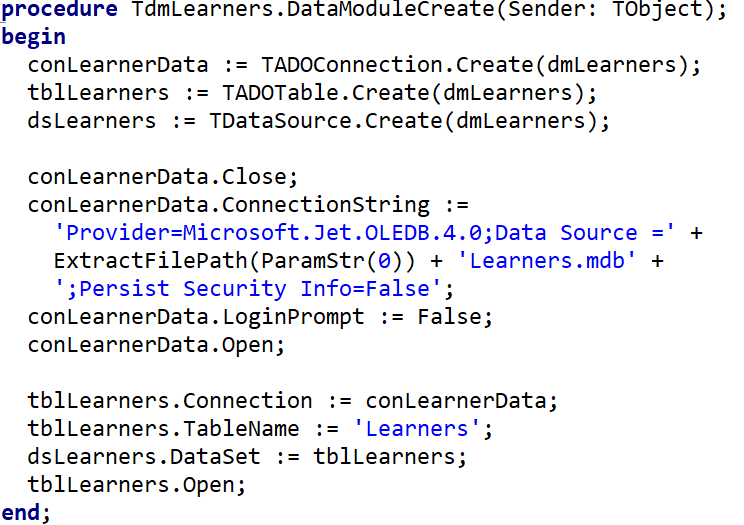
Step-by-Step Setup
- Create a Data Module: File → New → Data Module. Save it as
DataModule_u.pas. - Drop TADOConnection onto the Data Module. Set up the connection string (browse to your .mdb file). Set
LoginPrompt = False. - Drop TADOTable onto the Data Module. Set
Connectionto the ADOConnection. SetTableName. SetActive = True. - Drop TDataSource onto the Data Module. Set
DataSetto the TADOTable. - On your main form: add the Data Module name to the
usesclause at the top of your unit. - Drop TDBGrid onto your main form. Set its
DataSourceto the DataSource you created in the Data Module. - The grid should now show your database records!
Name components so you know what they are at a glance:
conStudents (TADOConnection) • tblStudents (TADOTable) • dsStudents (TDataSource) • dbgStudents (TDBGrid)
Navigating Records
Think of records as pages in a book. These methods let you turn pages:
| Method | What it does |
|---|---|
tblStudents.First | Jump to the very first record |
tblStudents.Last | Jump to the last record |
tblStudents.Next | Move forward one record |
tblStudents.Prior | Move back one record |
tblStudents.Eof | Returns True when you have gone past the last record (End Of File). Use in a WHILE loop to process all records. |
dm.tblStudents.First;                        // start at record 1
while not dm.tblStudents.Eof do           // keep going until past last
begin
  memOut.Lines.Add(dm.tblStudents['Name']); // do something with this record
  dm.tblStudents.Next;                       // move to next record
end;If you forget tblStudents.Next inside the loop, the program will be stuck on the first record forever — an infinite loop that will crash Delphi.
Accessing Field Values in Code
Once connected, you can read the value of any field in the current record using this syntax:
variable := DataModuleName.TableName['FieldName'];sName := dm.tblStudents['Name']; // reads the Name field
sSurname := dm.tblStudents['Surname']; // reads the Surname field
iGrade := dm.tblStudents['Grade']; // reads the Grade field
// Display in a label
lblInfo.Caption := dm.tblStudents['Name'] + ' ' + dm.tblStudents['Surname'];Delphi also lets you reach a field through FieldByName, e.g. dm.tblStudents.FieldByName('Name').AsString instead of dm.tblStudents['Name']. The two do the same job — this page sticks to the square-bracket version, but you'll come across FieldByName in other code and it's worth being able to recognise it.
Dataset States
A TADOTable is always sitting in one of a small set of named states, and that state controls what you're allowed to do with the current record. You've actually been relying on these states already — calling Edit or Insert doesn't touch any data by itself, it just switches the dataset into a state where changing data is legal.
| State | What it means |
|---|---|
dsInactive | The table is closed (Active is False). No reading or writing is possible until it's reopened. |
dsBrowse | The normal resting state once a table is open. You can look at records and move between them, but the current record is locked against edits. |
dsEdit | Entered by calling Edit. The active record can now be changed; Post saves it and drops the dataset back into dsBrowse. |
dsInsert | Entered by calling Insert. A blank record is waiting to be filled in; Post adds it to the table and returns to dsBrowse. |
This is why trying to change a field's value without calling Edit or Insert first raises an error — the dataset is still sitting in dsBrowse, which doesn't allow it.
Inserting a New Record
Adding a new record is a 3-step process: prepare → fill in values → save.
dm.tblStudents.Insert;                    // Step 1: prepare a blank new record
dm.tblStudents['Name']    := edtName.Text;     // Step 2: fill in the fields
dm.tblStudents['Surname'] := edtSurname.Text;
dm.tblStudents['Grade']   := sedGrade.Value;
dm.tblStudents.Post; // Step 3: save to the databasePost will raise an error if you assign a primary-key value that another record already has. It's tempting to just use tblStudents.RecordCount + 1 as the next number, but that scheme breaks the moment an earlier record has ever been deleted — you can end up reissuing a number that's already taken. The safer approach is to scan the table for whatever the highest existing value currently is, and add one to that:
function GetNewStudentNo: Integer;
var
  iLargest : Integer;
begin
  dm.tblStudents.First;
  iLargest := 0;
  while not dm.tblStudents.Eof do
  begin
    if dm.tblStudents['StudentNo'] > iLargest then
      iLargest := dm.tblStudents['StudentNo'];
    dm.tblStudents.Next;
  end;
  Result := iLargest + 1;
end;
Editing an Existing Record
// First navigate to the record you want to change, then:
dm.tblStudents.Edit;                      // Step 1: put the record into edit mode
dm.tblStudents['Grade'] := 12;            // Step 2: change the value
dm.tblStudents.Post;                      // Step 3: save the change
Deleting a Record
// Navigate to the record first, then:
dm.tblStudents.Delete; // removes the current record permanentlyThere is no undo. Always confirm with the user before deleting: if MessageDlg('Delete this record?', mtConfirmation, mbYesNo, 0) = mrYes then dm.tblStudents.Delete;
Changing a Field for All Records at Once
Some tasks need to touch every record in a table, not just one — for example handing out 5 bonus marks to every student, or applying a fee discount to a whole grade. This is really the same "loop through all records" pattern used earlier, just with an Edit / Post pair added inside it:
dm.tblStudents.First;
dm.tblStudents.DisableControls;      // stop the DBGrid refreshing on every single record
while not dm.tblStudents.Eof do
begin
  dm.tblStudents.Edit;
  dm.tblStudents['Mark'] := dm.tblStudents['Mark'] + 5;
  dm.tblStudents.Post;
  dm.tblStudents.Next;
end;
dm.tblStudents.First;
dm.tblStudents.EnableControls; // switch the grid's updates back onWithout this pair of calls, a DBGrid linked to the same dataset would redraw and scroll on every single record while the loop runs — distracting to watch, and noticeably slower once a table has more than a handful of records. DisableControls tells linked data-aware controls to stop refreshing until EnableControls is called again.
Searching for a Record
To find a specific record, loop through all records and check each one:
dm.tblStudents.First;
while not dm.tblStudents.Eof do
begin
  if dm.tblStudents['Surname'] = edtSearch.Text then
  begin
    ShowMessage('Found: ' + dm.tblStudents['Name']);
    Break;   // stop searching once found
  end;
  dm.tblStudents.Next;
end;
Filtering Records
A TADOTable can also show only the records that match a condition, without writing any SQL. Set Filter to a condition string, then set Filtered to True to apply it.
dm.tblStudents.Filter := 'Grade = 11';         // only Grade 11 records
dm.tblStudents.Filtered := True;               // switch the filter on
...
dm.tblStudents.Filtered := False;              // switch it off again — shows all records
Filter hides records that don't match — it changes which records you see. Sort changes the order of the records you see. You can use both together.
Sorting Records
dm.tblStudents.Sort := 'Surname ASC';         // A to Z by surname
dm.tblStudents.Sort := 'Mark DESC';           // highest mark first
dm.tblStudents.Sort := 'Grade ASC, Surname ASC'; // by grade, then surname
Complete Example — Finding the Highest Mark
var
  iHighest : Integer;
  sTopName : String;
begin
  iHighest := 0;
  sTopName := '';
  dm.tblStudents.First;
  while not dm.tblStudents.Eof do
  begin
    if dm.tblStudents['Mark'] > iHighest then
    begin
      iHighest := dm.tblStudents['Mark'];
      sTopName := dm.tblStudents['Name'];
    end;
    dm.tblStudents.Next;
  end;
  lblResult.Caption := sTopName + ' scored the highest: ' + IntToStr(iHighest);
end;
Searching For and Editing All Matching Records
The earlier search example stops at the first match. Often you need to change every record that matches — for example every learner whose surname contains the text the user typed. The loop visits every record, tests each one, and only puts a record into edit mode when it matches.
The test uses Pos, exactly as you use it on any string. If Pos returns a number greater than 0, the search text appears somewhere inside the field. Converting both sides with UpperCase stops capital letters from causing a mismatch.
var
  sFind : String;
begin
  sFind := UpperCase(edtSearch.Text);
  dm.tblStudents.First;
  while not dm.tblStudents.Eof do
  begin
    if Pos(sFind, UpperCase(dm.tblStudents['Surname'])) > 0 then
    begin
      dm.tblStudents.Edit;                                  // only matching records get edited
      dm.tblStudents['Surname'] := UpperCase(dm.tblStudents['Surname']);
      dm.tblStudents.Post;                                  // save the change
      memOut.Lines.Add(dm.tblStudents['Name'] + ' ' + dm.tblStudents['Surname']);
    end;
    dm.tblStudents.Next;                                    // ALWAYS move on, match or not
  end;
end;Every record you change needs its own Edit … Post pair, and both must sit inside the if. The Next goes outside the if, so the loop moves on whether or not the record matched. Put Next inside the if and the loop gets stuck on the first non-matching record forever.
Deleting All Records That Match a Condition
Deleting several records follows the same loop, but there is one important difference. When you call Delete, the dataset automatically moves on to the record that came after the deleted one. The pointer is already sitting on a fresh, unchecked record. If you called Next as well, you would jump over that record without ever testing it.
So only call Next when you did not delete:
dm.tblStudents.First;
while not dm.tblStudents.Eof do
begin
  if dm.tblStudents['Grade'] = 12 then
    dm.tblStudents.Delete                // no semicolon: the else belongs to this if
  else
    dm.tblStudents.Next;                 // only move on when nothing was deleted
end;Imagine two Grade 12 learners sitting one after the other. If you write Delete; Next;, the first one is deleted, the pointer lands on the second, and Next immediately moves past it — so the second learner is never checked and survives. Use the if … Delete else Next pattern above. Remember too that deleting cannot be undone, so confirm with the user before running a loop like this.
Calculating an Average From a Table
Finding an average needs two running values as you loop: a total and a count. Add the field to the total and add 1 to the count for each record that qualifies. After the loop, divide. The count can only be 0 if no record qualified, and dividing by 0 is an error, so test the count first.
var
  rTotal, rAverage : Real;
  iCount : Integer;
begin
  rTotal := 0;
  iCount := 0;
  dm.tblStudents.First;
  while not dm.tblStudents.Eof do
  begin
    if dm.tblStudents['Grade'] = 11 then
    begin
      rTotal := rTotal + dm.tblStudents['Mark'];
      Inc(iCount);
    end;
    dm.tblStudents.Next;
  end;

  if iCount > 0 then
  begin
    rAverage := rTotal / iCount;
    lblResult.Caption := 'Grade 11 average: ' + FloatToStrF(rAverage, ffFixed, 5, 1);
  end
  else
    lblResult.Caption := 'There are no Grade 11 learners yet.';
end;
To average every record, leave out the if on the grade and add each mark unconditionally. The guard on iCount stays.
Counting Related Records With Nested Loops
Suppose each learner record stores a ClassID that matches the ClassID of a record in tblClasses. To show, for each class, how many learners belong to it, you need a loop inside a loop:
- The outer loop visits every class (the parent table).
- For each class, the inner loop scans all the learners (the child table) and counts those whose
ClassIDmatches.
Two things must happen inside the outer loop, before the inner loop begins: set the count back to 0, and move the child table back to its first record with First. If you skip either, the second class starts with the first class's count, or starts with the child table already sitting at its end, so nothing is counted at all.
var
  iCount : Integer;
begin
  dm.tblClasses.First;
  while not dm.tblClasses.Eof do              // outer loop: every class
  begin
    iCount := 0;                              // reset for THIS class
    dm.tblStudents.First;                     // restart the child table for THIS class
    while not dm.tblStudents.Eof do          // inner loop: every learner
    begin
      if dm.tblClasses['ClassID'] = dm.tblStudents['ClassID'] then
        Inc(iCount);
      dm.tblStudents.Next;
    end;

    if iCount > 0 then                         // skip classes with no learners
      memOut.Lines.Add(dm.tblClasses['ClassName'] + ': ' + IntToStr(iCount));
    dm.tblClasses.Next;                       // next class
  end;
end;The outer loop must call tblClasses.Next and the inner loop must call tblStudents.Next. Mixing them up leaves one of the loops unable to finish. Because the learners are scanned once for every class, this is fine for the small tables used in school projects, but it gets slow with thousands of records.
Linked Tables (Master-Detail)
Two related tables can be linked so that selecting a record in the master (parent) table automatically shows only the matching records in the detail (child) table — for example, click a class and see only that class's learners. The link is made on the shared key field (the foreign key in the detail table matching the primary key in the master).
tblLearners.MasterSource := dsClasses;   // point at the MASTER table's DataSource
tblLearners.MasterFields := 'ClassID';   // the linking (foreign key) field
Now the detail grid filters itself as you move through the master table — a one-to-many relationship shown live on screen. (These properties are usually set in the Object Inspector, but can be set in code as above.)
Use a master-detail link when you want two grids that stay in sync as the user browses. Use an SQL join (see Grade 12 SQL — Joining Tables) when you want the linked data combined into a single result set for a report.
Editing Records Without Code — Data-Aware Controls
Everything else on this page shows how to insert, edit and delete records using code. Delphi also provides data-aware controls that let a user browse and change records directly on the Form, with no code at all.
TDBNavigator — A Toolbar for the Dataset
A TDBNavigator (from the Data Controls tab) is a data-aware control with a row of buttons for moving through and maintaining a dataset. Set its DataSource property the same way you would for a DBGrid.
| Button | What it does |
|---|---|
| First / Prior / Next / Last | Move the pointer — the same as calling those methods in code. |
| Insert | Opens up a blank record (the dataset switches to dsInsert state) ready for the user to type into. |
| Delete | Removes the active record straight away — no confirmation unless you configure one. |
| Edit | Unlocks the active record for changes (the dataset switches to dsEdit state). |
| Post | Writes whatever was typed or changed back to the table. |
| Cancel | Throws away an in-progress edit or insert instead of saving it. |
| Refresh | Reloads the grid's data from the table — handy if something else may have changed the underlying records. |
The DBNavigator's Insert and Delete buttons act the instant they're clicked — there's no built-in step to check that what the user typed makes sense, or that a new primary key doesn't clash with one that already exists. That's exactly why the rest of this page prefers to add, edit and delete records through code: it gives you a chance to validate input and show your own confirmation messages first. A quick safety net if you do use the DBNavigator for deleting is to set its ConfirmDelete property to True, which pops up an "are you sure?" prompt before a record disappears.
DBEdit, DBText and DBCheckBox — Single-Field Controls
Sometimes a full grid is more than you need — you might just want one field of the current record shown somewhere on the Form, such as a name next to a photo. Each of these controls links to exactly one field, using the same two properties:
DataSource → select your TDataSource (dm.dsStudents)
DataField → choose the field from the dropdown (e.g. "Surname")| Control | Use for |
|---|---|
DBEdit | Any text or numeric field you want the user to be able to change. |
DBText | Showing a field's value without letting the user change it — useful for a read-only field such as a primary key. |
DBCheckBox | A True/False field, shown as a tick box instead of text. |
Delphi doesn't write a change to the table the instant it's made — it sits in a buffer until something posts it. That happens automatically the moment the user moves to a different record, or you can trigger it sooner yourself, either in code or via a DBNavigator's Post button.
Connecting a Database Dynamically (in Code)
Everything above used components dropped onto a Data Module at design time. You can also build the whole connection at runtime with code — no components needed. This is called a dynamic connection, and it is useful when the database path is only known while the program runs (e.g. the user browses to the file).
usesDynamic database objects live in two units. Add ADODB and DB to the uses clause before you can create them in code.
Declare the three objects (usually under public in the Data Module, or in the form):
public
  conDB  : TADOConnection;
  tblStudents : TADOTable;
  dsStudents  : TDataSource;
Create and wire them together — build the connection string, point the table at the connection, then link the DataSource:
procedure TdmData.DataModuleCreate(Sender: TObject);
begin
  // 1. Create the connection object
  conDB := TADOConnection.Create(Self);
  conDB.LoginPrompt := False;        // don't ask for a password
  conDB.ConnectionString :=
    'Provider=Microsoft.Jet.OLEDB.4.0;' +
    'Data Source=' + ExtractFilePath(Application.ExeName) + 'Students.mdb;';
  conDB.Connected := True;

  // 2. Create the table and link it to the connection
  tblStudents := TADOTable.Create(Self);
  tblStudents.Connection := conDB;
  tblStudents.TableName  := 'tblStudents';
  tblStudents.Active      := True;

  // 3. Create the DataSource and link it to the table
  dsStudents := TDataSource.Create(Self);
  dsStudents.DataSet := tblStudents;
end;
Finally, link your on-screen TDBGrid to the DataSource. Do this in the main form's OnShow event:
procedure TfrmMain.FormShow(Sender: TObject);
begin
  dbgStudents.DataSource := dmData.dsStudents;
end;The Data Module is usually created after the main form. If you try to link the grid in the main form's OnCreate event, the Data Module does not exist yet and you get an access violation error. Use OnShow, which fires later, once everything exists.
Grade 11 — Year Planner Grade 11
Based on the 2026 IT CAPS. Grade 11 introduces 1D arrays, text files, user-defined methods and databases. Note: SQL, OOP and 2D Arrays are Grade 12 topics.
This shows when each topic is taught during the year — it is not a list of what any single test covers. Any work done so far this year, plus the foundational work from earlier grades, can still be assessed, so don't study only the current term's topics.
- 1D arrays: concept, declaration, population
- Nested FOR loops with arrays
- Array calculations (sum, average, min, max)
- Linear search
- Binary search (sorted array)
- Bubble sort & selection sort
- Parallel arrays
- Extend string methods from Grade 10
- Date methods: DateToStr, TimeToStr, IsLeapYear
- Binary number ↔ decimal conversions in code
- Motherboard: components, slots, buses
- BIOS/UEFI & POST
- Cache memory (L1/L2/L3) & caching
- RAM vs ROM in depth; HDD vs SSD
- Computer performance factors
- OS types (stand-alone, embedded, network)
- Compilers vs interpreters
- Multitasking, multithreading, multiprocessing
- Virtual memory & virtualisation/VMs
- Network topology (star), NIC, modem, switch, router
- VoIP, Intranet/Extranet, VPN, location-based computing
- Social: LBC implications, AUP, capabilities & limitations
- Computer management: threats, malware, remedies, backups
- Text files: physical vs logical file names
- AssignFile, Reset, Rewrite, Append, CloseFile
- ReadLn, WriteLn, EOF
- FileExists check & exception handling
- Reading multiple lines; populating arrays from file
- Writing/appending; generating text reports
- User-defined procedures (no parameters)
- Procedures with value parameters
- User-defined functions (return values)
- Functions with parameters
- Input validation using methods
- Microblogging, SMS, instant messaging, social media
- Video casting, podcasting, VoIP, video conferencing
- Mobile devices, browsers, apps
- GPS, 4G/5G, Bluetooth, Wi-Fi, access points
- Shaping, throttling, protocols (POP3, SMTP, IMAP, VoIP)
- Data security: passwords, encryption, multi-layer verification
- Blockchain: definition & purpose
- Digitalisation effects, gig economy
- Online services, video conferencing, social media & influencing
- Future careers: digital forensics, 3D printing, privacy consultant
- Remote work, office automation, robotics, AI overview
- DBMS: definition, functions, examples
- Database types (desktop, server, distributed)
- Database careers (DBA, programmer, analyst)
- Connect to a database by path in code
- TADOConnection, TADOTable, DataSource, DBGrid
- Navigate records (First, Next, Eof)
- Access field values with code
- Insert, Edit, Delete, Post records
- Search/filter records using code (no SQL)
- Multi-form GUI design
- Data quality: accuracy, correctness, currency, completeness
- Data validation: format, type, range, check digit
- Records, fields & field types
- Tables & relationships (1:1, 1:M, M:M)
- Referential integrity & ERDs
- Creating a simple database (design, maintain, query)
- Effects of computer & human error on data
- Effects of cybercrime (identity theft, ransomware, SQL injection)
- PAT finalization
- Revision of all T1–T3 practical
- Evolution of internet (IoT characteristics & uses, 4IR)
- Big Data (Volume, Variety, Velocity)
- Download vs streaming, live broadcasts, VOD, IPTV
- Compression: lossy vs lossless (MP3, JPEG, MPEG-4)
- Static vs dynamic websites
- Location-based services, HTTP vs HTTPS
- MFA, OTP, security tokens
- Internet careers (web designer, developer, multimedia designer)
- Social implications of Big Data, IoT & globalisation
- 4IR: effects on employment & society
- Protecting online identity & digital footprint
Exam Extras Out-of-CAPS
These topics are not explicitly required by CAPS but have appeared in NSC past papers (2015–2024). Knowing them can mean the difference between a pass and a distinction.
Items marked P1 appear in Paper 1 (practical/Delphi), P2 in Paper 2 (theory), and Both in either paper. These are supplementary — master your CAPS content first.
The Software Development Process
CAPS never teaches "how to plan a whole program" as one topic — instead it hands you the individual planning tools (IPO tables, TOE charts, pseudocode) at different points across Grade 10 and 11. Strung together in order, those tools form a complete process for turning a vague idea into a finished, working program. None of this is examinable on its own, but following it will make your PAT — and any open-ended practical question — far less overwhelming.
- Pin down exactly what the program must do. A one-line description ("a till program") is not enough to start coding from — write out every input the program will receive, every calculation or decision it must make, and every output it must produce. This is the same information an IPO table asks for (Grade 10 T1, Algorithms & Problem Solving), just applied to the whole program instead of one calculation.
- Sketch the interface before placing a single component. Decide which forms the user will see, what components sit on each one, and how the user moves between them. Keep the same layout, colours and button placement on every form — a program that looks different from screen to screen feels unfinished even when the code is solid.
- Map out which event triggers which task. For every button, checkbox or form event, list precisely what must happen when it fires — this is exactly what a TOE (Task–Object–Event) chart is for (also covered on the Algorithms & Problem Solving page). Doing this before writing code stops the common mistake of half-remembering what a button was supposed to do halfway through typing its handler.
- Break the plan into procedures and functions before typing the body of any of them. Decide which pieces of logic will repeat, which need a return value and which don't, and what needs to pass between them as parameters — this is where the Procedures & Functions (Grade 11 T2) content and the local-vs-global variable rules on that page earn their keep.
- Write the code in small, testable pieces rather than the whole program at once — build and run after every procedure or two so that when something breaks, you know it's in the last few lines you typed, not buried somewhere in 200 lines you haven't tested yet.
- Test with data designed to break it, not just data that works. Run the program with an empty text box, a negative number, the largest and smallest values it should accept, and anything else a careless user might type — this is the mindset behind the Input Validation content (Grade 10 T2). Where something goes wrong before you can even see the output, Delphi's debugger (breakpoints, F8 stepping, the Watch List — see Data Types & Variables) will show you exactly which line is responsible.
A PAT is marked over months, revisited many times, and often built on by a partner or by future-you after a long break. Time spent planning up front — even just a page of notes on what each form does — is what makes it possible to pick the project back up in Term 4 and still understand your own Term 2 code.
Practical Extras — Paper 1 (Delphi)
These Delphi functions, components and techniques are not listed in CAPS but appear regularly in exam questions or are needed to solve exam problems efficiently.
StringReplace()
Replaces all or first occurrence of a substring within a string.
s := StringReplace(s, 'old', 'new', [rfReplaceAll]);
Format() function
Formats numbers/strings with precise control — Format('%.2f', [rVal]) gives 2 decimal places. More powerful than FloatToStrF.
Random() & Randomize()
Generate random integers. Always call Randomize; first to seed the generator. Random(100) returns 0–99.
TOpenDialog / TSaveDialog
Let users browse for files at runtime.
if OpenDialog1.Execute then sFile := OpenDialog1.FileName;
DateToStr() & StrToDate()
Convert between TDate values and string representation. Used with TDateTimePicker.
sDate := DateToStr(dtpDate.Date);
Try…Except…End (Exception Handling)
Catch runtime errors gracefully — e.g. invalid StrToInt input.
try iNum := StrToInt(edtNum.Text); except ShowMessage('Invalid'); end;
Memo.Lines.Count
Returns the number of lines in a Memo. Often used in loops to process all memo lines.
for i := 0 to Memo1.Lines.Count - 1 do
SameText() / CompareText()
Case-insensitive string comparison — avoids problems when user types 'yes', 'YES' or 'Yes'.
if SameText(sInput, 'yes') then
IntToHex() & HexToInt()
Convert integers to hexadecimal strings and back. Sometimes tested in conjunction with number systems theory.
sHex := IntToHex(255, 4); // = '00FF'
Odd() & Even() functions
Built-in boolean checks — cleaner than MOD 2.
if Odd(iNum) then // true if iNum is odd
Break & Continue in loops
Break stops the rest of the loop from processing. Continue skips the rest of the current pass and moves on to the next iteration. Both appear in exam solutions — know the difference. (Break vs Exit is taught on the Loops page.)
Theory Extras — Paper 2
These theory topics have appeared in NSC Theory papers but sit at the edge of or outside the formal CAPS scope. They typically appear in social implications or "current technology" questions.
Artificial Intelligence (AI) & Machine Learning
AI appears regularly in social implications questions — automation of jobs, AI decision-making, bias in AI, chatbots. Not deeply technical — understand the concept and its social effects.
Blockchain Technology
A distributed digital ledger of linked blocks. Used in cryptocurrency, supply chain, and secure records. Appeared in Gr12 theory papers. Know: what it is, how it works, and 2 uses.
Deep Fakes
AI-generated fake videos or audio that appear authentic. Social implications question topic — impacts on trust, truth, and politics. Know the definition and two risks.
Dark Web
A part of the internet not indexed by search engines, accessed via special software (Tor). Used for anonymity — legal and illegal uses. Appeared in theory cybercrime questions.
Net Neutrality
The principle that all internet traffic should be treated equally — ISPs cannot throttle or prioritise certain content. A social/political IT topic.
IPv6
The successor to IPv4 — uses 128-bit addresses (vs 32-bit) to solve address exhaustion. Format: 2001:0db8:85a3::8a2e:0370:7334. Know why it was introduced.
RAID Levels (0, 1, 5)
RAID 0: speed (striping, no redundancy). RAID 1: mirroring (exact copy). RAID 5: striping with parity (balance of speed + fault tolerance). CAPS only mentions RAID in general — exams go deeper.
Steganography
Hiding secret information within ordinary files (images, audio) without detection. Different from encryption — encryption scrambles data; steganography hides its existence. Appeared in theory questions.
Smart Contracts
Self-executing contracts where terms are written in code on a blockchain. No middlemen needed. Related to blockchain technology — appeared in Gr12 social implications.
Edge Computing
Processing data close to where it is generated (the "edge" of the network) rather than sending it all to a central cloud server. Reduces latency — important for IoT and 5G.
Bus Network Topology
All devices share a single communication line (the bus). Not in the current CAPS but appeared in older papers. Advantage: cheap. Disadvantage: single point of failure; performance drops with more devices.
Mesh Network Topology
Each device connects to several others, so data has more than one possible path. Not in the current CAPS (it sits under "network innovation"). Advantage: very reliable — traffic reroutes if a link fails. Disadvantage: expensive, many connections needed. It's how "mesh Wi-Fi" systems work.
Social Engineering
Manipulating people (rather than systems) to reveal confidential information. Includes pretexting, baiting, tailgating. Appears in cybercrime theory questions.
Number System Conversions
Exams frequently ask you to convert values — not just explain systems. Practise: decimal↔binary, decimal↔hex, binary↔hex. Know the place values (powers of 2 and 16).
POPIA (Protection of Personal Information Act)
South African law governing how personal data must be collected, stored, and protected. Appears in privacy and legal implications questions. Know: what it is, who it protects, and 2 requirements.
Cybercrimes Act (2020)
SA legislation that criminalises hacking, ransomware, online fraud, and malicious communications. Often referenced in cybercrime theory questions for Gr12.
Digital Twins
A virtual replica of a physical object or system, updated in real time from sensor data. Used in engineering, manufacturing, and smart cities. Appeared in 4IR/IoT questions.
Complete Delphi Functions Quick Reference
A comprehensive reference of all Delphi functions you need to know — both CAPS-required and commonly appearing in exams.
String Functions
| Function/Procedure | What it does | Example |
|---|---|---|
Length(s) | Returns number of characters | Length('Hello') = 5 |
Pos(find, source) | Position of substring (0 if not found) | Pos('lo','Hello') = 4 |
Copy(source, start, len) | Extract substring | Copy('Hello',2,3) = 'ell' |
Insert(text, var s, pos) | Insert text into string at position | Insert('!','Hello',6) → 'Hello!' |
Delete(var s, pos, len) | Remove characters from string | Delete(s,1,3) |
UpperCase(s) | All uppercase | UpperCase('hi') = 'HI' |
LowerCase(s) | All lowercase | LowerCase('HI') = 'hi' |
Trim(s) | Remove leading/trailing spaces | Trim(' Hi ') = 'Hi' |
StringReplace(s,old,new,flags) | Replace substring(s) | StringReplace(s,'a','e',[rfReplaceAll]) |
SameText(s1,s2) | Case-insensitive comparison (boolean) | SameText('Yes','yes') = True |
Concat(s1,s2) | Join two strings (same as +) | Concat('Hel','lo') |
s[i] | Character at index i (1-based) | s[1] = first character |
Math Functions
| Function | What it does | Example |
|---|---|---|
Sqr(x) | x squared (x²) | Sqr(4) = 16 |
Sqrt(x) | Square root | Sqrt(16) = 4 |
Power(base, exp) | base to the power of exp | Power(2,8) = 256 |
Round(x) | Round to nearest integer | Round(4.6) = 5 |
Trunc(x) | Remove decimal (truncate toward zero) | Trunc(4.9) = 4 |
Ceil(x) | Round UP to integer | Ceil(4.1) = 5 |
Floor(x) | Round DOWN to integer | Floor(4.9) = 4 |
Abs(x) | Absolute value | Abs(-5) = 5 |
Random(n) | Random integer 0 to n-1 | Random(6)+1 simulates a die |
Randomize | Seed the random generator (call once) | Call before Random() |
Inc(x) / Inc(x,n) | Increment by 1 or n | Inc(i) ≡ i := i+1 |
Dec(x) / Dec(x,n) | Decrement by 1 or n | Dec(i,3) ≡ i := i-3 |
Odd(n) | True if n is odd | Odd(3) = True |
Pi | Returns π (3.14159…) | rArea := Pi * Sqr(r) |
Type Conversion Functions
| Function | Converts | Example |
|---|---|---|
StrToInt(s) | String → Integer | StrToInt('42') = 42 |
StrToFloat(s) | String → Real | StrToFloat('3.14') |
StrToIntDef(s, default) | String → Integer (safe — returns default if invalid) | StrToIntDef(edtNum.Text, 0) |
IntToStr(n) | Integer → String | IntToStr(42) = '42' |
FloatToStr(r) | Real → String | FloatToStr(3.14) |
FloatToStrF(r, fmt, digits, dec) | Formatted real → String | FloatToStrF(r, ffFixed, 6, 2) |
Ord(c) | Char → Integer (ASCII value) | Ord('A') = 65 |
Chr(n) | Integer → Char | Chr(65) = 'A' |
UpCase(c) | Single char to uppercase | UpCase('a') = 'A' |
IntToHex(n, digits) | Integer → Hex string | IntToHex(255,2) = 'FF' |
DateToStr(d) | TDate → String | DateToStr(Now) |
FormatFloat(fmt, r) | Real → formatted string | FormatFloat('#,##0.00', 1234.5) |
Past Paper Patterns & Tips
Paper 1 (Practical) — What Always Appears
| Section | What to expect | Common traps |
|---|---|---|
| Q1: General programming | Strings, loops, decisions, calculations (~30–40 marks) | Off-by-one errors in loops; forgetting to initialise variables |
| Q2: Arrays & files | 1D/2D arrays, text file reading/writing (~20–25 marks) | Using wrong index (0 vs 1-based); not closing file |
| Q3: OOP | Class with constructor, accessors, mutators, toString (~25–30 marks) | Calling Create on the object var (not class name); forgetting Result in functions |
| Q4: Database/SQL | TADOQuery, SQL statements including JOIN (~20–25 marks) | Not calling qry.Close before changing SQL; wrong JOIN ON condition |
| Recursion (Gr12) | Write a recursive function; trace it (~10–15 marks) | Missing base case; not returning Result |
Paper 2 (Theory) — What Always Appears
| Topic | Typical mark allocation | What examiners look for |
|---|---|---|
| Hardware & software | 15–20 marks | Specific advantages/disadvantages; real-world examples |
| Networks & internet | 20–25 marks | Correct terminology; topology advantages/disadvantages |
| Databases & normalisation | 20–30 marks | Correct normal form identification; proper primary/foreign key use |
| Social implications | 20–25 marks | Balance of positive AND negative effects; specific examples |
| Cybercrime | 10–15 marks (Gr12) | Correct crime type names; effects on both victim and business |
| Current technology (IoT, AI, VR) | 10–15 marks (Gr12) | Practical application examples; social implications |
General Exam Advice
- Read the question twice — and write your Paper 2 answers in sentences or short paragraphs, never bullet points, whatever the command word is. Markers only credit the first few bullets, but they must read a whole paragraph
- Never leave a practical question blank — partial marks are awarded for correct structure
- In SQL: always check your WHERE condition matches the question's criteria exactly
- In OOP: write the constructor first — it sets up all the attributes you'll use elsewhere
- In theory: "advantage AND disadvantage" means you need both for full marks